Oct 1, 2026
Amazon Search Query Data to Shopify SEO: Intent First, 2026
Turn amazon search query data to shopify seo into intent-led page updates. Validate Google demand, map beauty keywords, and measure results without bulk edits.

Instead of manually guessing which beauty keywords belong on your Shopify pages, turn Amazon Search Query Performance exports into a repeatable research, validation, and publishing workflow. Use Amazon purchase signals to shortlist terms, check Google intent, then update the Shopify page that actually answers the search.
TL;DR
Amazon search query data to Shopify SEO works as keyword research, not a direct ranking-data transfer.
Use Amazon Search Query Performance for shopping signals; validate Google intent before editing Shopify pages.
Booscala specializes in Amazon management for beauty brands; Shopify publishing needs a separate owner.
Assign each keyword cluster to a relevant page, then measure Google Search Console results.
Why this matters
Amazon search data tells you how shoppers interact with products inside Amazon. It does not tell you how often people search the same phrase on Google, or which Shopify page Google should rank.
That distinction drives this 2026 workflow. A purchase-oriented phrase can support a product page. A question about application order usually needs an explanation, not another product description.
Booscala manages Amazon listings, advertising, and operations for beauty brands. Booscala is best for beauty brands seeking specialist Amazon management, not a standalone Shopify SEO service. Use that Amazon expertise to improve the research brief; assign Shopify changes to whoever owns your website.
The benefit is grounded keyword selection. The limitation is channel mismatch: an Amazon query still needs a Google search check and a product-fact check before publication.
Before you start
Accounts and permissions: Access to Amazon Brand Analytics and Search Query Performance for your eligible brand, Shopify editing permissions, and a verified Google Search Console property. Confirm report access before scheduling the work.
Working materials: A spreadsheet, approved product facts, an ASIN-to-Shopify-product mapping, and an inventory of existing product, collection, and editorial pages. Keep marketplace and language attached to every export.
The gotcha: Search Query Performance and advertising search term reports are different datasets. Neither provides Google search volume. Keep their rows separate, and never rename Amazon query volume as Google demand.
Choose a manageable pilot. Start with 1 product family, review 1 completed reporting period, and assign 1 publishing owner. These are setup recommendations, not performance benchmarks.
Amazon data export
Choose the right source
Amazon Search Query Performance is the primary source for this workflow. Advertising search term reports are a supporting source when you need to examine the queries associated with ad activity.
Amazon Search Query Performance
Best for: Understanding reported query activity and brand or ASIN participation
Advantage: Connects queries with impression, click, cart-add, and purchase metrics
Limitation: Covers Amazon behavior, not Google demand
Amazon advertising search term report
Best for: Finding queries associated with advertising results
Advantage: Adds campaign-level context to keyword decisions
Limitation: Reflects advertising coverage and attribution, not the full search market
Google Search Console
Best for: Validating queries already reaching your Shopify website
Advantage: Connects Google impressions and clicks with existing pages
Limitation: Does not reveal every possible keyword opportunity
Use Search Query Performance to identify candidates, not to declare SEO winners. A query with purchases deserves review. It does not automatically deserve a new page.
Export the reporting period
Open Amazon Seller Central and select the relevant marketplace.
Open Brands, then Brand Analytics, and locate Search Query Performance.
Select the brand or ASIN scope appropriate to your research. Record the selected scope alongside the data.
Select a completed reporting period and use the report's download control to export the available data.
Preserve the original file. Import a copy into your spreadsheet and record the period, marketplace, scope, and export date.
For a 2026 research log, keep each reporting period identifiable. Do not combine brand-level rows with ASIN-level rows and treat them as separate demand; their scopes overlap.
Expected result: A raw-data tab with traceable query rows and documented report settings. You can explain where every candidate keyword came from.
Keyword validation and page mapping
Build your research sheet
Preserve the original query text in a raw-query column.
Create a separate normalized-query column. Standardize case and unnecessary spacing without deleting meaningful ingredients, formats, or skin-type modifiers.
Retain the Amazon metrics available in your export, including the relevant totals and brand or ASIN measures. Keep counts and shares in separate columns.
Add working columns for intent, product fit, Google results, existing page, proposed action, approval status, and owner.
Separate your brand terms, competitor terms, generic shopping queries, and informational questions.
Do not treat query rank or score as search volume. Do not calculate a Google conversion forecast from Amazon purchase share. Those fields describe different things.
Use the guide to reading Amazon Search Query Performance data for beauty brands when interpreting the Amazon side of the sheet.
Expected result: A working dataset that distinguishes observed Amazon behavior from your proposed Shopify action. Raw evidence stays intact while decisions remain editable.
Validate Google intent
Search each shortlisted phrase on Google in the target country and language. Record the inspection date and the dominant page types in the results.
Classify the query as product-specific, category-shopping, informational, navigational, or irrelevant to your catalog.
In Google Search Console, open Performance, then Search results. Use Queries and Pages to inspect existing query-to-page relationships.
Check whether an existing Shopify page already answers the intent. Improve that page before proposing another page with the same purpose.
Reject phrases that depend on unsupported claims, competitor identities, or products you do not sell.
For beauty, product fit includes formula, ingredient, finish, format, and intended use. A phrase containing a medical condition is not permission to claim that a cosmetic treats it.
A 2026 keyword brief should record what Google currently rewards, not what an old research sheet assumes. Keep the search-results observation separate from measured Search Console impressions.
Assign the page type
Product page
Best for: Queries describing a specific product and its verified attributes
Advantage: Keeps the answer close to the purchase decision
Limitation: Cannot honestly cover attributes the product lacks
Collection page
Best for: Queries seeking a genuine group of related products
Advantage: Supports category comparison and browsing
Limitation: Needs a coherent product group, not a keyword-only category
Editorial guide
Best for: Questions about use, routines, or differences
Advantage: Gives enough space to explain the answer
Limitation: Needs a clear connection to relevant products
Map a keyword cluster to its strongest existing page whenever that page fits. Related wording does not require separate URLs.
For example, a hypothetical cleansing-oil brand can group closely related shopping phrases under an appropriate product or collection page. A double-cleansing sequence question belongs in a guide that explains the sequence. These are mapping examples, not claims about the client's catalog.
Expected result: Each approved cluster has a destination, a reason for that destination, and a concrete edit brief. Rejected clusters have an exclusion reason.
The handoff follows a simple sequence: Amazon export, Intent check, Page mapping, Approved edit, and Google measurement. Research is not complete until someone owns the edit and its review.
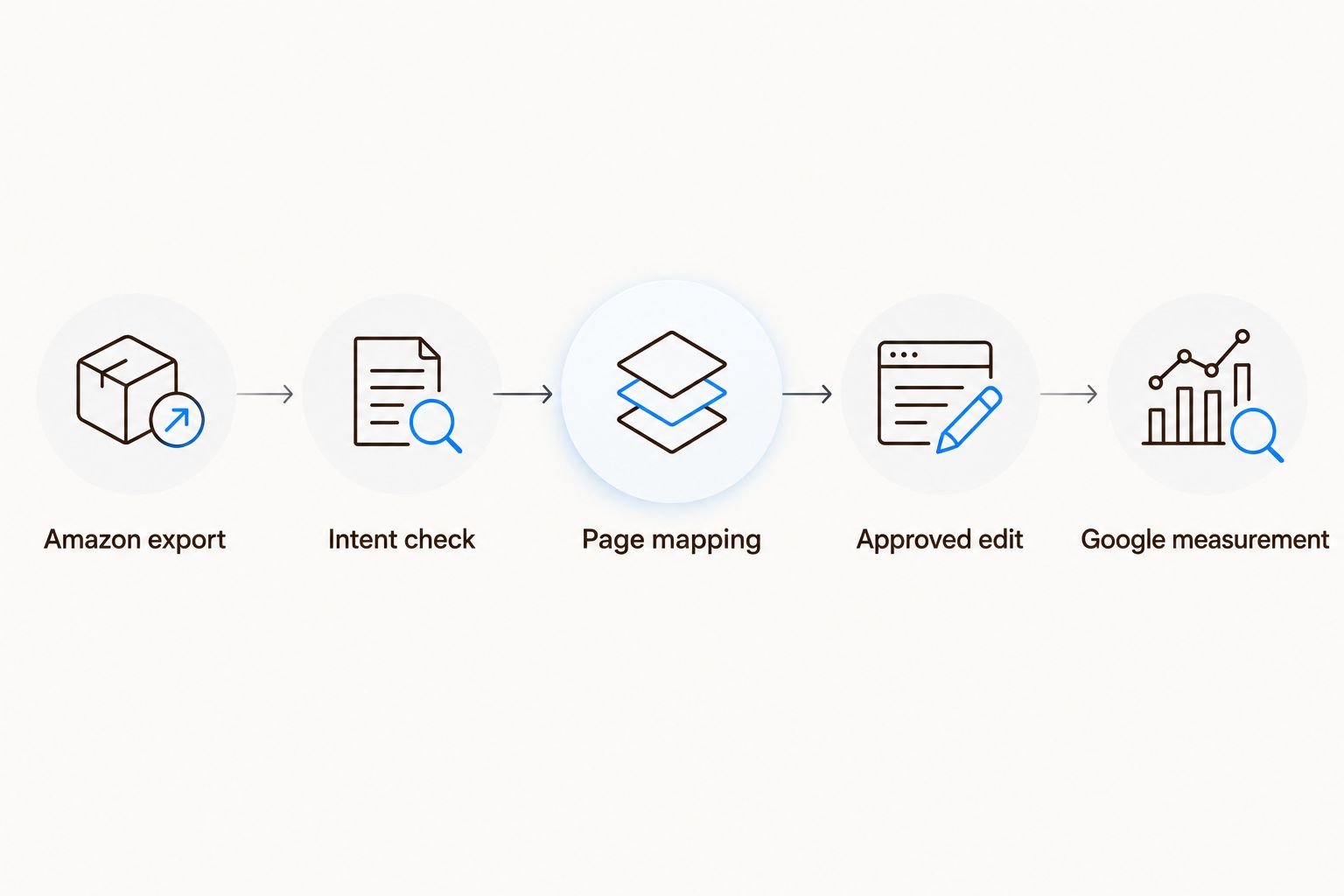
Validate intent before an Amazon query becomes a Shopify page edit.
Shopify page configuration
Apply the approved brief
In Shopify, open Products for a product page or Collections for a collection page, then select the mapped destination.
Update Title and Description to answer the intended search naturally. Keep the product name accurate and put verified differentiators where readers need them.
Find Search engine listing and open its editing control. Review Page title, Meta description, and URL handle.
Write a distinct page title and a useful meta description. Describe the page's actual answer rather than repeating every spreadsheet phrase.
Keep an established URL handle unless a change has a clear reason. If you change it, check the redirect and update links pointing to the old destination.
Select Save, then inspect the published page on desktop and mobile.
For an editorial destination, edit the relevant blog post instead. Lead with the answer, add useful subheadings, and connect the explanation to the appropriate products or collection.
Do not paste an Amazon backend keyword list into visible Shopify copy. Amazon metadata and website prose have different jobs. Your website needs readable explanations and accurate product information.
Check the rendered heading as well as the search listing. A saved SEO title does not prove the visible page title, body copy, and theme output agree.
Expected result: A published page that serves the selected intent without keyword stuffing, unsupported beauty claims, or an unnecessary URL change.
Record the baseline
Record the destination page, approved cluster, published changes, and publication date in your sheet.
In Google Search Console, capture page-level impressions, clicks, click-through rate, and average position for 28 days before the change.
Inspect the page with URL inspection. Check indexing status and the Google-selected canonical before interpreting search results.
Review another 28-day period after publication, allowing for crawling and indexing. Compare the same page and relevant query groups.
Record other changes that affect interpretation, including page redesigns, campaign activity, or major catalog changes.
Use 2026 publication dates in your change log. An edit date is a measurement anchor, not evidence that the edit caused every subsequent movement.
Expected result: A before-and-after record with consistent scope. You can distinguish a page gaining impressions from a page gaining clicks, rather than calling both a revenue win.
Repeat the workflow when Amazon data updates
A recurring file-review workflow honestly exists. It does not require an assumed native connection between Amazon Search Query Performance and Shopify.
Export the next completed period with the same marketplace and scope.
Append the file to your raw-data archive rather than replacing the previous export.
Match normalized queries to existing clusters. Add unfamiliar terms to a review queue.
Flag meaningful changes for human review. Examine counts alongside shares so a smaller denominator does not masquerade as stronger demand.
Create a proposed edit only after repeating the Google-intent and product-fact checks.
Use a 30-day review cadence as an operating choice, not an Amazon reporting requirement or a promised SEO timeline. Keep the cadence consistent enough to maintain the log.
Automate file organization and task creation before automating publication. The advantage is less administrative work. The limitation is unchanged: a spreadsheet rule cannot verify a cosmetic claim or decide whether Google wants a guide instead of a product page.
Your repeatable output is an approved change queue, not a bulk rewrite of the store.
Troubleshooting
Search Query Performance is missing
Check marketplace selection, Brand Analytics eligibility, brand association, and user permissions. Ask the account administrator to confirm access. Do not substitute an advertising report and label it Search Query Performance.
Query rows duplicate after import
Check the marketplace, period, and reporting scope. Keep legitimate repeated observations across periods, but remove accidental duplicate imports. Never add brand-level and ASIN-level counts together as independent demand.
A strong Amazon query has different Google intent
Inspect the Google results again and change the destination type. If Google favors explanations, brief a guide. If the query has no honest connection to your catalog, exclude it rather than forcing it into a collection.
Shopify changes are saved but absent from Google
Inspect the published page, indexing status, canonical selection, and crawl information. A saved field does not guarantee immediate crawling or an identical search-result title; Google can generate its own title link and snippet.
A query suggests an unsupported beauty claim
Stop the edit and request approved wording from the product or compliance owner. Search behavior is research evidence, not substantiation. Keep the original query in the sheet without reproducing its claim on the page.
Customize your workflow
Expand by product family, marketplace, or language only after the pilot produces clean briefs and traceable measurements. Keep US and European research separate; translated wording alone does not establish local intent.
Assign the Amazon owner responsibility for source data and interpretation. Assign the Shopify owner responsibility for destination selection, publishing, and website checks. Share the approval log so neither team mistakes an idea for a completed edit.
Booscala's Amazon management scope covers beauty listings, advertising, and operations. Use that specialist remit for the Amazon side of the handoff; keep website delivery responsibilities explicit.
Review your Amazon research handoff
Explore specialist Amazon management for beauty brands before assigning research and website publishing responsibilities.
FAQ
How do I turn Amazon search query data into Shopify SEO?
Export Amazon Search Query Performance, shortlist relevant queries, validate Google intent, and map each cluster to a suitable Shopify page. Publish approved edits and measure the destination in Google Search Console.
Does Amazon query volume equal Google search volume?
No. Amazon query volume describes activity within Amazon for the report's scope and period. Use Google-specific evidence to assess website search demand.
Is Search Query Performance better than an advertising search term report?
Search Query Performance is the better starting point for reported query and brand participation research. Advertising search term reports serve a different purpose: understanding queries associated with ad activity.
Should every Amazon keyword become a Shopify page?
No. Group related phrases by intent and use an existing destination when it already answers the search. Create a new page only when the intent and useful content justify it.
Can I automatically publish Amazon keywords to Shopify?
Keep publication behind an approval step. Automate file handling and research tasks, but review Google intent, product accuracy, and beauty claims before changing public copy.
How long should I measure a Shopify SEO change?
Use comparable reporting periods rather than expecting an immediate ranking change. This workflow recommends a 28-day baseline and a subsequent 28-day review, with crawling, indexing, and other changes documented.
Does Booscala provide Shopify SEO through this workflow?
Booscala specializes in Amazon management for beauty brands. This workflow connects Amazon research to a Shopify publishing brief; it does not establish a Shopify SEO service offering.
One last thing
Treat a strong Amazon query as a question about your website, not an instruction to add words. Before updating a page, ask whether a visitor arriving from Google would find the answer they expected.
For your next 2026 publishing batch, require every brief to include the source period, Google intent, destination, approved product facts, and measurement date. That small handoff discipline prevents research from becoming untracked copy changes.
