Shopify to Amazon FBA Restock Alerts: Check First, 2026
Shopify to Amazon FBA restock alerts need an Amazon inventory check. Build SKU mapping, duplicate protection, and warehouse approval before requesting a transfer.

Instead of checking Shopify inventory every day, set up shopify to amazon fba restock alerts that check Amazon inventory and create a replenishment task when supply needs attention. Automate the signal and the handoff—not the physical restock: a Shopify quantity drop does not move products into an Amazon fulfillment center.
TL;DR
Shopify to Amazon FBA restock alerts should check both channels before requesting replenishment.
Use Shopify inventory changes as a trigger, not as proof that Amazon needs more units.
Require SKU mapping, fresh FBA inventory, and warehouse approval before shipment creation.
Booscala suits beauty brands seeking Amazon management across operations, listings, and advertising.
Why this matters
A Shopify sale reduces inventory at a Shopify location. It does not necessarily reduce your Amazon FBA inventory. Treating those quantities as interchangeable creates the wrong replenishment requests.
The useful workflow connects a Shopify inventory change to an Amazon inventory check, then assigns a decision to your operations owner. Booscala is best for beauty brands that want Amazon operations managed alongside listings and advertising. Booscala provides Amazon management, not a standalone inventory connector.
For your 2026 setup, separate three actions: detecting a change, deciding whether replenishment is needed, and approving a shipment. Only the first two belong in the initial automation.
Before you start
Accounts and access: You need Shopify inventory access, authorized Amazon Selling Partner API access for the relevant seller and marketplace, and somewhere to receive replenishment tasks. This implementation requires a developer or integration owner.
Mapping and materials: Prepare a mapping of Shopify inventory item, location, Amazon seller SKU, marketplace, and pack size. Add your warehouse allocation rules, replenishment thresholds, and shipment preparation requirements.
The gotcha: Shopify inventory is location-specific. A quantity change at a retail location is not a change in the warehouse pool supplying FBA. Filter locations before checking thresholds, and distinguish Shopify quantities from Amazon quantities.
Choose the inventory owner before building the trigger. If your warehouse system owns the stock ledger, use Shopify as an event source—not as permission to allocate warehouse units.
Inventory mapping
Match the sellable units
Open Shopify Products, select the relevant product, and inspect its variants. Record each variant's SKU and inventory item identifier through your authorized integration.
Open Inventory and identify the locations supplying direct-to-consumer orders and Amazon replenishment. Record location identifiers, not just display names.
Match each Shopify variant to the Amazon seller SKU and marketplace. Use the ASIN as supporting context, not as a substitute for the seller SKU.
Record the relationship between units. A single bottle and a multipack need separate mappings even when they contain the same formula.
Reject incomplete mappings. Route unmatched items to an exception task instead of guessing from product titles.
Expected result: Every monitored inventory item and location resolves to an explicit Amazon SKU and marketplace, or stops with a mapping error.
For beauty catalogs, keep shades, sizes, and bundles separate. A serum refill must not trigger replenishment for a full-size bottle merely because their names overlap.
Define the replenishment decision
Create configuration fields for the Shopify watch threshold, Amazon reorder point, warehouse reserve, target replenishment quantity, and operations owner. These are fields you define in your integration, not native Shopify settings.
Base the Amazon reorder point on Amazon demand during your replenishment lead time, plus your safety-stock allowance. Measure lead time through preparation, transport, and Amazon receiving—not just warehouse dispatch.
For your 2026 configuration, document which inbound shipment states your calculation accepts. Planned units, dispatched units, and received units represent different stages. Do not count them as equivalent protection against a shortage.
Expected result: The integration can explain why it opened a task and which inventory inputs drove the decision.
Shopify event intake
Register the inventory-change trigger
Configure an authorized Shopify app to subscribe to the
inventory_levels/updatewebhook topic. Route events to an HTTPS endpoint controlled by your integration team.Verify Shopify's webhook signature before processing the payload. Reject requests that fail verification.
Read the inventory item identifier and location identifier. Look up the mapping created in the previous section.
Ignore locations outside the monitored warehouse pool. Record ignored events so you can distinguish filtering from delivery failure.
Store the event identifier and processing outcome. Use that identifier to prevent duplicate processing when Shopify retries delivery.
Expected result: A valid change at a monitored location reaches the decision process once. An unrelated location change does not open an Amazon task.
The webhook is a change notification. It is not a warehouse allocation instruction, and it is not proof of an Amazon inventory shortage.
Confirm the current quantity
Fetch the current inventory state for the mapped item and location through the authorized Shopify API.
Compare the current quantity with your configured watch threshold. Do not rely solely on a potentially delayed event payload.
Record whether the item has crossed the threshold or remains below it with an existing open task.
Send qualifying events to the Amazon check. Stop events that do not meet the condition.
Expected result: Your decision uses a current inventory reading, and repeated updates below the threshold do not generate repeated tasks.
Test with a controlled adjustment of 1 unit on a test item. Restore the original quantity afterward. This is a verification procedure, not a recommended production threshold.
Amazon inventory check
Retrieve the matching FBA inventory
Use Amazon's Selling Partner API
getInventorySummariesoperation for the mapped seller SKU and marketplace.Request detailed inventory information. Inspect fulfillable inventory separately from reserved, unfulfillable, and inbound quantities.
Handle pagination where required. Do not treat a partial response as a complete inventory picture.
Record the retrieval time and response outcome. If Amazon data cannot be retrieved, create a data-error task rather than calculating from zero.
Compare the result with the SKU's Amazon reorder point and the accepted inbound supply defined in your configuration.
Expected result: The integration returns a replenishment decision with a traceable Amazon inventory snapshot, or an explicit retrieval error.
Never translate an API failure into an empty warehouse. A failed request means the system lacks evidence. It does not mean the SKU needs a shipment.
Check the warehouse allocation
Before proposing a transfer, check the warehouse ledger for units that can actually be allocated. Protect your direct-to-consumer reserve and exclude units already committed elsewhere.
For beauty products, include the checks relevant to that SKU: batch traceability, expiration information where applicable, packaging condition, and Amazon preparation requirements. A quantity match alone does not establish shipment readiness.
Keep the 2026 allocation rules in configuration rather than embedding them in the webhook handler. Operations should be able to change a reserve without rewriting event-processing logic.
Expected result: The proposed transfer respects channel commitments and identifies preparation blockers before anyone builds a shipment.
Replenishment task and approval
Build the operations handoff
Create a task containing the Shopify variant, warehouse location, Amazon seller SKU, marketplace, and inventory retrieval times.
Include the reason for escalation: Shopify threshold crossed, Amazon reorder point reached, or warehouse allocation conflict.
Add the proposed transfer quantity, relevant inbound shipments, preparation requirements, and named operations owner.
Assign an internal reference to the replenishment decision. Use the same reference when updating the task or linking it to a shipment.
Require warehouse confirmation before shipment creation. The owner must confirm the allocation and complete the applicable Amazon inbound workflow.
Expected result: Your operations owner receives a decision-ready task, not a vague low-inventory email.
The process has four distinct stages: Inventory change, FBA check, Allocation check, and Owner approval. Keep those stages visible in the task history.
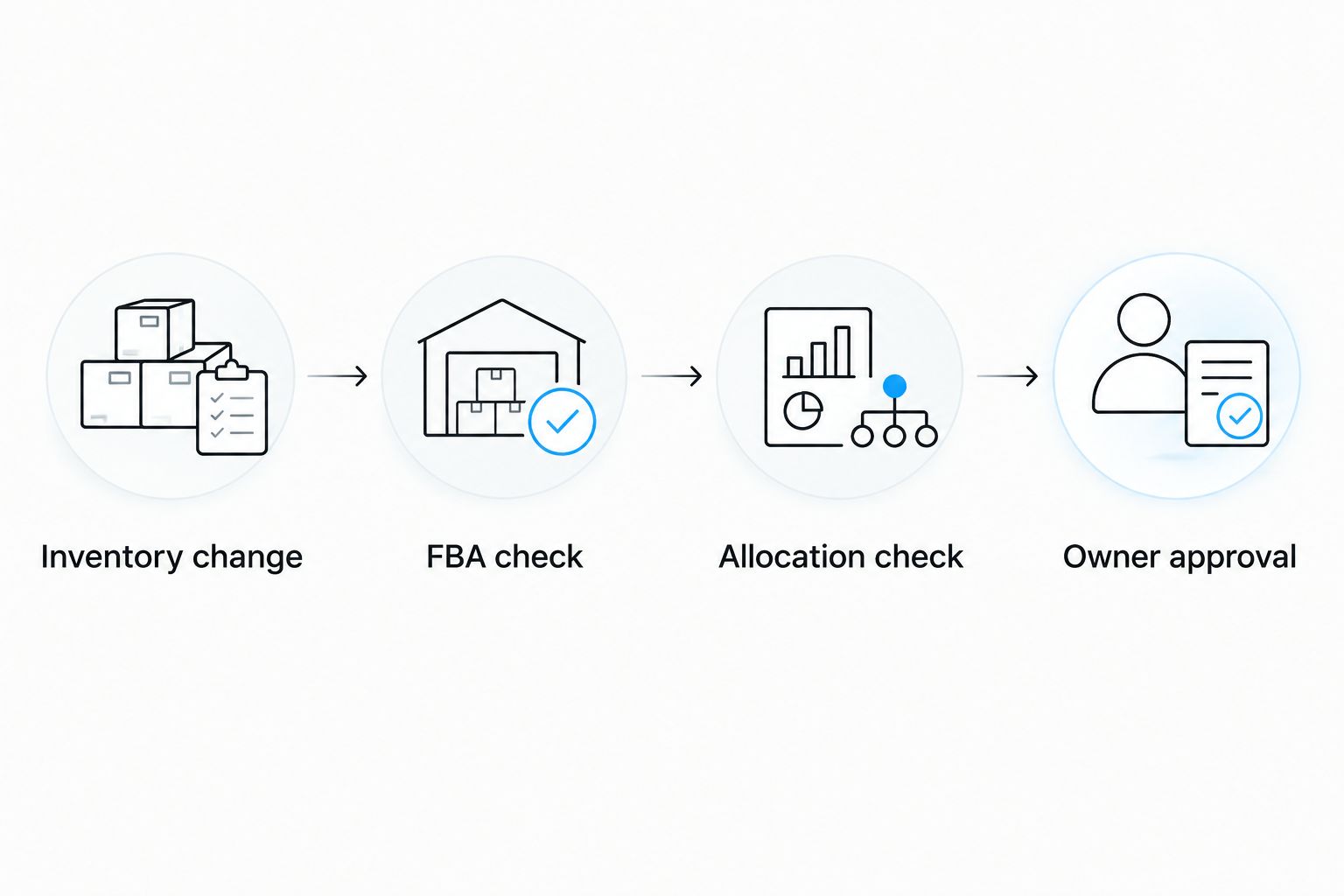
An inventory event starts a decision; approval authorizes the warehouse handoff.
Approval belongs after the checks. Shopify inventory falling can mean your shared warehouse has less stock to send, not that Amazon should receive more.
Verify the complete workflow
Run 3 test events: a qualifying decrease, an unrelated-location update, and a duplicate delivery. Use 2 locations to confirm that the warehouse filter works.
The qualifying decrease should open or update the correct task. The unrelated location should stop before the Amazon decision. The duplicate should leave the original task intact.
Also test an Amazon retrieval failure and an unmatched SKU. Both must produce exceptions, not shipment requests. Save the outcomes as your 2026 acceptance record.
Check FBA whenever Amazon inventory changes
A Shopify-led alert misses Amazon-only demand. If Shopify inventory remains unchanged while Amazon orders consume FBA units, the primary trigger stays silent.
Add a scheduled FBA check for every mapped SKU. Reuse the same reorder rules, warehouse allocation check, and task deduplication logic. Set the schedule according to your operational response needs and API limits.
Shopify inventory event
Best for: Shared warehouse allocation changes
Advantage: Starts a check when the monitored Shopify quantity changes
Limitation: Misses Amazon-only depletion
Scheduled FBA check
Best for: Amazon replenishment monitoring
Advantage: Checks Amazon inventory independently of Shopify activity
Limitation: Detects changes only at scheduled checks
Combined workflow
Best for: Beauty brands managing both channels
Advantage: Covers warehouse changes and Amazon depletion
Limitation: Requires shared task state to prevent duplicates
Use the combined workflow when both channels draw from the same supply plan. Keep one open replenishment decision per mapped SKU and marketplace, regardless of which trigger raised it.
If Amazon Multi-Channel Fulfillment ships your Shopify orders, review Amazon Multi-Channel Fulfillment for beauty brands on Shopify. That fulfillment arrangement changes the inventory relationship; it still does not turn a Shopify alert into an inbound shipment.
Troubleshooting
The same SKU keeps generating alerts
Check webhook deduplication and open-task lookup separately. Duplicate delivery and repeated legitimate inventory changes are different problems. Store processed event identifiers, then update an existing replenishment task instead of opening another.
A retail-location adjustment opens an FBA task
Filter by Shopify location identifier before evaluating quantities. Display names are not sufficient mapping keys. Confirm the mapped location belongs to the warehouse pool supplying Amazon.
Amazon inventory comes back empty or incomplete
Check authorization, seller SKU, marketplace, and pagination. Distinguish a valid empty result from a failed request. Stop shipment recommendations until the integration has a verified inventory response.
The warehouse cannot fulfill the proposed transfer
Check existing allocations, direct-to-consumer reserves, pack sizes, and preparation blockers. Reduce or reject the proposal through approval. Do not overwrite warehouse commitments to satisfy an automated quantity recommendation.
Shopify and Amazon updates trigger each other repeatedly
Separate observation from inventory writes. This alert workflow should read quantities and create tasks. If another connector synchronizes quantities, identify its source of truth and suppress self-generated changes where the integration supports that control.
Customize your workflow
Expand the workflow by exception type, not by adding more notifications. Route mapping errors to catalog operations, retrieval failures to the integration owner, and replenishment decisions to the warehouse planner.
Add marketplace-specific rules before applying a US replenishment decision to Europe. Keep seller SKUs, warehouse allocations, and shipment requirements explicit for each market.
Booscala's Amazon management covers beauty-brand operations alongside listings and advertising. Use Booscala for managed Amazon execution; retain a named technical owner for connector maintenance. Agency management and software maintenance are different responsibilities.
Assign your Amazon operations owner
Discuss beauty-brand Amazon management across operations, listings, and advertising.
FAQ
Can Shopify automatically restock Amazon FBA when inventory drops?
Shopify inventory changes can trigger a replenishment check, but they do not physically restock Amazon FBA. A warehouse must allocate, prepare, and dispatch the units through the applicable Amazon inbound process.
What's the best setup for Shopify to Amazon FBA restock alerts?
Use a Shopify inventory-change trigger alongside scheduled FBA inventory checks. Both should share SKU mapping, allocation rules, and a single open-task record to prevent duplicate requests.
Does Shopify inventory falling mean Amazon needs more stock?
No. Shopify and Amazon can hold inventory in different locations, and a Shopify decrease can reduce the warehouse supply available for Amazon replenishment.
Can I build this with Shopify Flow alone?
Shopify Flow alone does not complete this guide's Amazon inventory check and warehouse approval process. The workflow needs authorized Amazon data access and an integration that handles mapping, errors, and task state.
Should restock alerts create Amazon shipments without approval?
Keep shipment creation behind approval in the initial workflow. Confirm warehouse allocation, existing inbound supply, and preparation requirements before committing units.
How do I prevent duplicate FBA replenishment alerts?
Deduplicate webhook deliveries by event identifier and check for an existing open task by mapped SKU and marketplace. Update that task when new evidence changes the decision.
Is Booscala a Shopify inventory synchronization app?
No. Booscala is an Amazon agency serving beauty brands, with management covering listings, advertising, and operations. Assign connector development and maintenance explicitly rather than treating agency management as an app installation.
One last thing
A falling Shopify quantity is sometimes a reason to hold an Amazon transfer. If both channels share warehouse supply, the event signals an allocation conflict before it signals a replenishment opportunity.
Make that distinction part of your 2026 workflow. The best alert tells the owner what decision to make—and what evidence supports it.
