Oct 1, 2026
Sync Shopify Pricing to Amazon MAP Monitoring: Safe 2026
Sync Shopify pricing to Amazon MAP monitoring safely. Map variants to ASINs, separate MAP policy from store edits, and validate seller-level alerts before action.

Instead of manually checking Shopify edits against Amazon offers, sync Shopify pricing to Amazon MAP monitoring through a variant-to-ASIN mapping table and a separate, approved MAP policy record. Send changes into your monitoring workflow—not directly into Amazon repricing—so your team can review suspected violations without changing live offers.
TL;DR
Sync Shopify pricing to Amazon MAP monitoring through variant mappings, approved thresholds, and seller-level observations.
Shopify selling prices are reference data, not automatic minimum advertised price thresholds.
Amazon MAP monitoring needs seller identity, marketplace, observation time, and policy context.
Booscala is best for beauty brands seeking managed Amazon operations, not a standalone Shopify connector.
Why this matters
A Shopify price change is not a MAP policy change. Minimum advertised price monitoring compares an observed advertisement against your approved policy. Cross-channel pricing checks compare your own selling conditions. Keep those jobs separate.
For beauty catalogs, shade, size, formulation, and pack quantity matter. Matching a serum bundle to a single-bottle ASIN produces a misleading alert even when the integration works correctly.
Your 2026 workflow needs a clear boundary: Shopify supplies catalog and pricing context; your policy record supplies the threshold; your Amazon observation source supplies evidence. Start with the policy decisions in How to Defend MAP Pricing on Amazon Beauty before connecting data sources.
Booscala is best for beauty brands seeking managed Amazon operations, not a standalone Shopify connector. Its Amazon agency model covers listings, advertising, and operations. That service scope does not establish a ready-made pricing integration or replace legal review of your policy.
Before you start
Access: Have Shopify product-read access, permission to configure your integration, and an Amazon monitoring source that identifies individual seller offers. Confirm that the destination accepts updates through an API or supported import before building the trigger.
Materials: Prepare a variant-to-child-ASIN mapping, marketplace and currency assignments, an approved MAP policy record, and an alert owner. Get legal review for each market; do not copy a US policy into European markets unchanged.
The gotcha: Shopify's Price and Compare-at price fields are not MAP fields. A sale edit must not silently rewrite your approved threshold. Keep the policy record outside the ordinary selling-price update path.
Choose the connection method before configuring anything. These are implementation choices, not claims about a particular monitoring vendor.
Product-update events plus monitor API
Best for: Teams needing changes processed as they occur
Advantage: Sends changed products without waiting for a full catalog import
Limitation: Requires event handling, authentication, and recovery logic
Scheduled catalog read plus supported import
Best for: Teams with an import-capable monitor
Advantage: Creates a repeatable reconciliation process
Limitation: Checks happen on the chosen schedule, not immediately
Manual catalog export and review
Best for: An initial mapping pilot
Advantage: Lets you validate product identity before automation
Limitation: Still depends on someone completing each review
Use events for change detection and a scheduled reconciliation for recovery when both are supported. Start with manual review if your product mappings are unverified. Automating incorrect matches only creates incorrect alerts faster.
Catalog mapping
The mapping table is the foundation. Neither a product title nor a parent ASIN is a reliable substitute for the exact item being monitored.
Open Shopify Products and select a product. Review its variants and identify the SKU, size, shade, formulation, and pack quantity for each item you plan to monitor.
Create 1 mapping row per variant–marketplace–child-ASIN combination. Record the Shopify variant identifier, SKU, Amazon child ASIN, marketplace, currency, and pack description. A variant sold in several markets needs separate market records.
Check the Amazon item against the physical product specification. Confirm that the monitored offer represents the same shade, volume, and unit count. Exclude mismatched bundles from the comparison.
Record the approved policy identifier and effective period separately. Assign a person who can approve policy changes; a catalog editor should not inherit that authority automatically.
Mark unresolved mappings for review. Prevent those records from reaching the threshold comparison until someone confirms the match.
Expected result: Every monitored Amazon item traces back to a specific Shopify variant and market-specific policy. Unmapped items appear in an exception queue rather than disappearing from the workflow.
Keep identifiers stable. Product names can change during a listing refresh; your integration should continue joining records through identifiers, not rewritten titles.
For your 2026 setup, preserve an audit copy of the mapping before the first run. When an alert looks wrong, that record tells you whether the cause was a bad match, a changed catalog, or a genuine offer discrepancy.
Shopify change capture
Capture Shopify selling-price context without granting the integration permission to change Amazon offers. This workflow is read-and-monitor, not bidirectional synchronization.
In Shopify Products, open the relevant product or variant and inspect Price and Compare-at price. Treat them as distinct fields. The comparison field is not your policy threshold.
Configure a Shopify product-update webhook using the
products/updatetopic, or configure a scheduled product read if your implementation uses polling. Filter the resulting records to mapped variants.Read the current variant record after receiving the event. Extract the variant identifier, SKU, current selling-price context, currency context, and source update time. Ignore unrelated product edits when the relevant values have not changed.
Store the latest processed state for each mapped variant and market. Handle repeated deliveries without creating repeated changes, and reject an older source state when a newer state is already stored.
Schedule a reconciliation against the current catalog. Send failed records to a retry queue and surface persistent failures to the integration owner.
Expected result: A Shopify edit updates the monitoring reference record once. It does not overwrite MAP, change an Amazon offer, or generate duplicate alerts simply because an event was delivered again.
If Shopify Markets changes the customer-facing amount, confirm that your read captures the intended market context. A store's default currency alone does not establish the amount shown to every customer.
In the 2026 change log, retain the source event and processing outcome. Successful receipt is not the same as successful destination processing.
Monitoring comparison
Your monitoring destination needs three separate inputs: catalog context, approved policy, and Amazon offer evidence. Keep them separate in storage and in the comparison logic.
Configure the destination's supported API or import using its documented schema. Map Shopify data into reference fields only. Verify whether an update replaces a record or changes selected fields before sending a catalog-wide import.
Attach the approved policy record to each mapped item and market. Use the policy's effective period and approved exceptions. Do not derive the threshold from Shopify Compare-at price.
Collect Amazon observations by child ASIN, marketplace, and seller identity. Capture the advertised amount and any shipping or promotional context your source exposes. Compare only the components your reviewed policy covers.
Store 2 timestamps per comparison: the Shopify reference update time and the Amazon observation time. Preserve the policy version used for the decision as well.
Route an apparent below-policy observation to human review. Include the seller, item mapping, evidence, observation time, policy version, and assigned owner.
Expected result: An alert explains which seller observation was compared with which policy. A Shopify edit alone cannot create a confirmed violation.
Use the following data roles to prevent accidental substitution:
Shopify variant record
Best for: Catalog and direct-store context
Useful role: Identifies the item and records your store's selling conditions
Limitation: Does not establish an approved MAP threshold
Approved policy record
Best for: Threshold decisions
Useful role: Defines the applicable policy and exceptions
Limitation: Requires controlled updates and legal review
Amazon seller observation
Best for: Marketplace evidence
Useful role: Shows what a particular seller advertised when observed
Limitation: A snapshot does not prove continuous behavior
The comparison is a decision sequence, not a direct Shopify-to-Amazon write operation. Verify identity first, load the applicable policy, inspect the seller observation, and then review the evidence.
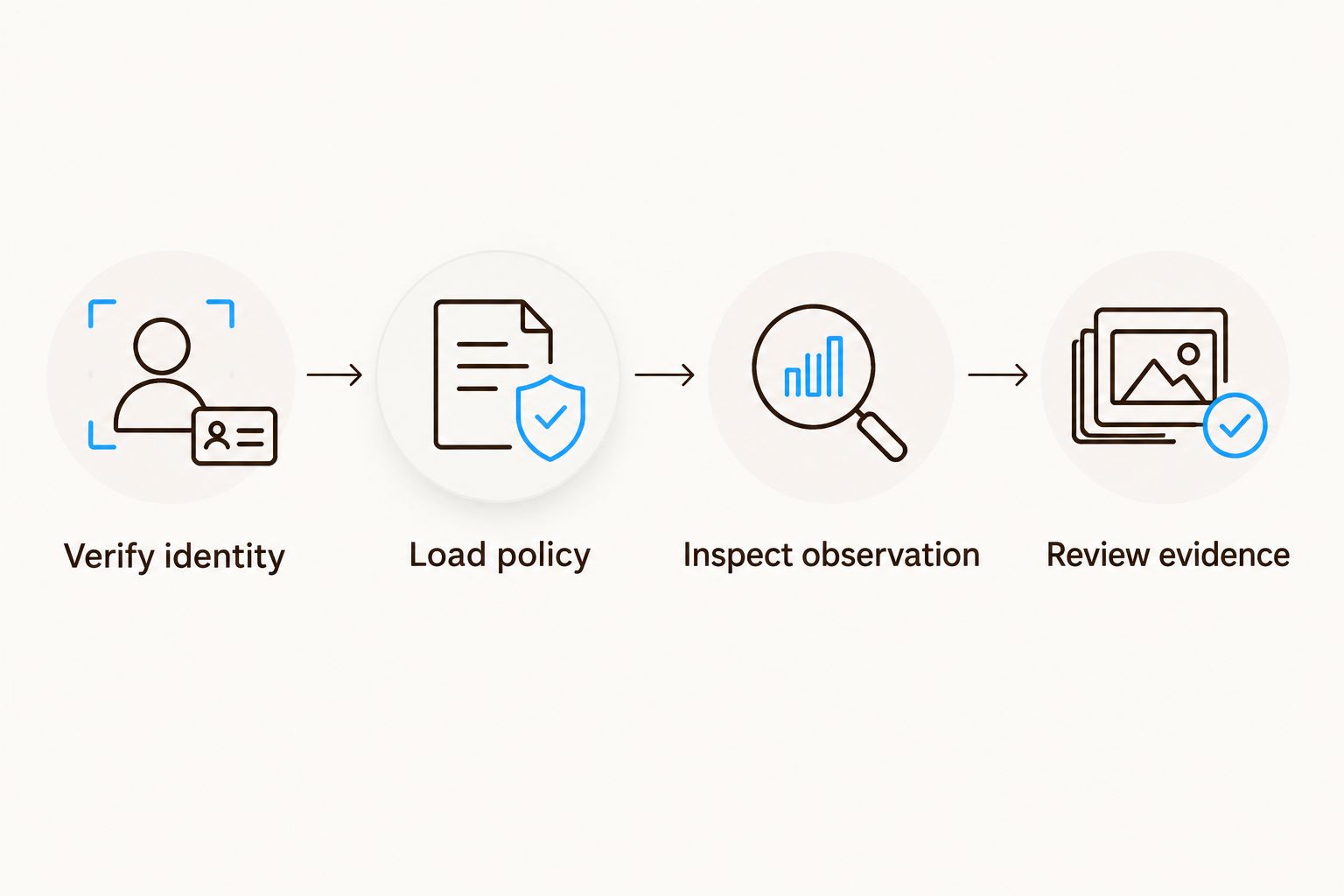
Shopify changes update context; approved policy controls the comparison.
Alert validation
Test the decision logic before routing alerts to your commercial team. A working connection proves data movement, not correct monitoring.
Run 3 test cases using controlled test records: an observation above the threshold, an observation below it, and a record with a missing mapping. Use test data rather than changing customer-facing offers.
Confirm that the above-threshold record produces no violation alert. Confirm that the below-threshold record creates a review item, not an automatic enforcement action.
Confirm that the unmapped record enters the mapping exception queue. Missing data must not be classified as compliant.
Replay a previously processed event. Verify that it produces no duplicate alert and cannot replace newer reference data.
Assign an alert owner and a separate integration-failure owner. Give both access to the evidence and processing history needed for their decisions.
Expected result: Correctly mapped observations reach review, unresolved items remain visible, and duplicate events do not inflate the queue.
Keep your 2026 pilot alert-only. Monitoring should not change your Amazon selling conditions or contact third-party sellers without an approved process.
If you want an Amazon agency rather than another internal operating task, Booscala manages Amazon operations for beauty brands. The advantage is an embedded management model; the limitation is that you still need approved policy, authorized access, and a verified integration method.
Recheck Amazon whenever an offer changes
Shopify-triggered monitoring catches changes in your own store. It does not detect every change made by an Amazon seller. Add a second workflow that starts from the Amazon observation source.
Use seller-offer updates from your monitoring source when supported, or schedule new observations.
Resolve each observation to the existing variant–marketplace–ASIN mapping.
Load the current applicable policy and latest Shopify reference state.
Apply the same comparison and evidence rules used in the Shopify-triggered workflow.
Update the existing review item when the same seller and item remain under review. Preserve each observation rather than creating disconnected tickets.
Best for: brands monitoring third-party sellers alongside their own direct store. This variant detects marketplace-side changes that do not originate in Shopify. Its limitation is the coverage and freshness of your observation source.
Maintain separate exception queues for failed data collection and suspected policy violations. A failed observation is an operational problem, not evidence that a seller complied or violated the policy.
Troubleshooting
Alerts follow every Shopify sale edit
The integration is treating a selling-price field as the policy threshold. Remove that mapping, restore the approved policy record, and rerun affected comparisons. Shopify edits should update reference context only.
A shade or bundle triggers the wrong alert
The join uses a title, parent ASIN, or incomplete SKU match. Rebuild the mapping around the exact variant and child ASIN. Check pack quantity and market-specific packaging before reopening monitoring.
The destination shows an older Shopify state
An older event has overwritten newer data, or a destination update failed. Compare source update times, reject outdated writes, and reconcile against the current Shopify record. Retrying blindly can repeat the same error.
Currency differences create false discrepancies
The workflow compares different market contexts. Partition records by marketplace and currency, then check tax and shipping treatment against the reviewed policy. Do not convert a US threshold into a European rule automatically.
The queue contains duplicate seller alerts
Event retries or repeated observations create new tickets each time. Deduplicate processing and group open review items by seller, ASIN, marketplace, and applicable policy. Retain observation history inside that review record.
Customize your workflow
Expand coverage only after the pilot passes. Add further variants, sellers, and markets while preserving the same mapping and policy controls.
For 2026 promotions, maintain approved exceptions with effective periods and an owner. Expire each exception through the policy process rather than leaving a temporary rule active indefinitely. Recheck affected observations when an approved policy changes, even if Shopify has not changed.
Keep commercial decisions separate from monitoring evidence. A low observation can inform a review, but it should not automatically trigger repricing, an advertising change, or a seller complaint.
Booscala's Amazon agency model suits beauty brands that want listings, advertising, and operations managed together. Treat the monitoring workflow as an operating process with accountable owners—not as proof that every alert warrants action.
Review your Amazon operating scope
Discuss Amazon management for your beauty brand and define ownership of monitoring exceptions.
FAQ
How do I sync Shopify pricing to Amazon MAP monitoring?
Map Shopify variants to Amazon child ASINs, send Shopify changes into a monitoring reference record, and compare seller observations against a separate approved MAP policy. Use the monitor's supported API or import method, then validate alerts before enabling operational follow-up.
Does Shopify's Compare-at price set my MAP threshold?
No. Shopify's Compare-at price is not an approved MAP policy field. Maintain the threshold separately and restrict changes to authorized policy owners.
Will this workflow update my Amazon selling prices?
No. This guide describes a read-and-monitor workflow, not Amazon repricing. Changing your own Amazon offers requires a separate integration and approval process.
Can I monitor every Amazon seller from my own seller account data?
Your own seller account data is not sufficient evidence of every third-party seller's advertised offer. Confirm seller-level coverage with your observation source and preserve seller identity with each observation.
What happens when a Shopify variant has no matching ASIN?
Route the variant to a mapping exception queue and exclude it from threshold comparison. Do not mark an unresolved item compliant or infer a match from its title.
Should coupons and shipping count toward a MAP alert?
Apply only the treatment specified in your legally reviewed policy. Preserve the available promotional and shipping context so a reviewer can assess the observation correctly.
Can I use the same MAP workflow in the US and Europe?
You can reuse the technical mapping structure, but market policies require separate legal review. Keep marketplace, currency, tax treatment, and policy applicability distinct.
Is Booscala a Shopify MAP monitoring app?
No. Booscala is an Amazon agency serving beauty brands and managing listings, advertising, and operations. Its stated service model does not establish a standalone Shopify monitoring connector.
One last thing
Monitor policy changes as carefully as product changes. An unchanged Shopify record can still require a new comparison when an approved policy takes effect. Add policy activation and expiration to your recheck process so your alerts reflect the rule that actually applies.
