Google Ads to Amazon Listings Conversion: Track It | 2026
Google Ads to Amazon listings conversion needs Amazon Attribution. Build tracked links, validate destinations, and separate purchase reporting from Google bidding.
Instead of manually comparing Google Ads clicks with unrelated Amazon sales totals, send search traffic through Amazon Attribution links and reconcile spend with attributed purchases. This 2026 Google Ads to Amazon listings conversion workflow separates what you can measure on Amazon from what Google Ads can actually use for bidding.
TL;DR
Google Ads to Amazon listings conversion measurement needs Amazon Attribution, not a Google tag installed on Amazon.
Use separate Amazon Attribution links for traffic segments you need to evaluate independently.
Amazon Attribution reports purchases; it does not automatically send purchase conversions into Google Ads.
Booscala manages Amazon listings, advertising, and operations for beauty brands that need one accountable team.
Why this matters
Google Ads knows which searches generated your clicks. Amazon controls the product page and checkout. Without Amazon-side attribution, putting those reports next to each other does not establish which ads generated purchases.
An Amazon Attribution link measures the handoff. It does not create a native Google Ads purchase integration. You cannot install your Google tag on an Amazon product detail page or checkout, so a standard website conversion setup does not solve this problem.
Booscala is an Amazon management agency best for beauty brands that want listings, advertising, and operations managed together. Its scope is Amazon-focused; Google campaign ownership and any reporting integration need explicit assignment rather than assumption.
For your 2026 measurement plan, distinguish attributed purchases from incremental purchases. Attribution connects reported outcomes to eligible ad interactions. It does not prove those customers would never have bought without the Google campaign.
Before you start
Account access: Have permission to edit Google Ads campaigns and access Amazon Attribution for the relevant brand and marketplace. Confirm eligibility inside your Amazon advertising account before building ads; access is not universal.
Destination and materials: Identify the exact product variation or Store page, approved product claims, keyword groups, and listing content. Check that the destination opens in the intended marketplace and supports the promise in your ad.
The setup trap: Decide how you will evaluate purchases before selecting a bid strategy. Amazon Attribution reporting is not an automatic Google Ads conversion feed, and Google Ads cannot optimize toward Amazon purchases it never receives.
Assign separate owners for the Google campaign, Amazon destination, and measurement record. One person can hold several roles. What matters is that someone can stop traffic when the destination or measurement breaks.
Do not begin with every product in your catalog. A recommended starting structure is 1 campaign, 1 tightly defined ad group, and 1 destination. That is a setup choice, not a performance benchmark; it makes the first measurement check easier to diagnose.
Destination and intent mapping
Write down the buyer's search intent before creating the campaign. Separate searches for a named product from searches for an ingredient, category, or skincare routine.
Match each group to a destination that answers that intent. Send a specific shade or product search to its detail page; use a relevant Store page when the shopper genuinely needs to browse a range.
Inspect the destination on mobile. Confirm the selected variation, images, bullet points, and product information agree with the ad's message.
Create a mapping record containing marketplace, campaign, ad group, destination, advertised product, attribution link, and owner. Give each record an unambiguous name that survives an export.
Expected result: Every planned ad group has a defined buyer intent and a matching Amazon destination. No campaign relies on a shopper finding the right product after landing somewhere unrelated.
Choose the destination deliberately
These are adjacent workflows, not interchangeable landing pages. Both need tracking and a separate assessment of the shopping experience.
Product detail page
Best for: Searches for a specific product, shade, or format
Advantage: Direct access to the product's buying decision
Limitation: Limited room to explain a broader routine or range
Relevant Store page
Best for: Searches for a brand range or product routine
Advantage: Presents related products in context
Limitation: Requires another product-selection step before checkout
For beauty ads, avoid promising a benefit the destination does not substantiate. A search for a cosmetic concern is not permission to add treatment claims. Use approved wording in both places.
Amazon Attribution configuration
Open Amazon Attribution in the advertising account for the destination marketplace. Confirm that you are working with the correct brand before creating measurement records.
Select Create campaign. Use a campaign name that identifies the marketplace, Google traffic, and product or range without relying on a colleague's memory.
Follow the account's creation flow to associate the relevant products and define the Google advertising traffic. Use the publisher and channel selections that match the campaign; do not label paid search as another source.
Enter the intended Amazon destination and generate the attribution link. Copy the full generated link into your mapping record without shortening it or removing parameters.
Create distinct measurement links for the segments you need to compare independently. Keep the same measurement granularity across campaigns so your report does not compare an entire campaign with a single ad.
Expected result: Your mapping record contains a complete Amazon Attribution link for each independently measured traffic segment. Each link opens the intended destination in the intended marketplace.
For the broader setup, use the guide to Amazon Attribution links for beauty campaigns.
Amazon Ads' published Amazon Attribution methodology uses a 14-day attribution window and a last-touch model. In this 2026 workflow, that means an attributed purchase can appear after the day you paid for its associated click. Do not treat a same-day export as a finished performance verdict.
Keep advertised-product results separate from broader brand results where the report provides both. A purchase elsewhere in the catalog answers a different question from a purchase of the advertised serum.
Google Ads campaign configuration
In Google Ads, open Campaigns, select New campaign, and choose Search. Follow the creation path that matches your available measurement; do not imply that an Amazon purchase conversion action already exists.
Configure geography and language for the destination marketplace. A US Amazon destination needs a deliberate US targeting decision, not an account-wide default copied from another campaign.
Add tightly related keywords. Start with specific commercial intent, then separate broader discovery terms rather than mixing both into an indistinguishable result.
In the responsive search ad, paste the complete Amazon Attribution link into Final URL. Write Headlines and Descriptions that accurately identify the product and the Amazon destination.
Review campaign-level and account-level URL settings. A Tracking template or Final URL suffix must not overwrite, duplicate, or break the attribution parameters.
Review bidding against the signals actually available. Maximize conversions and Target ROAS require relevant conversion data; an external report that Google Ads never receives is not that data.
Expected result: The ad points to the correct tracked Amazon destination, targets the intended shoppers, and uses a bidding approach consistent with the account's actual measurement.
Do not disguise the destination as your own website. Keep the displayed domain consistent with the landing destination and review Google's destination requirements before launch.
For 2026 campaigns, inspect automatically created or inherited assets as well. Any additional landing destination needs its own measurement decision; an untracked asset can make an otherwise tidy campaign report incomplete.
Validation and reporting configuration
Open the saved destination link and inspect the final landing experience. Confirm marketplace, product variation, and message alignment. This verifies the route, not a recorded ad interaction.
Use Ad Preview and Diagnosis to inspect targeting and ad eligibility without repeatedly clicking your own live ads. Check destination behavior separately from impression eligibility.
After genuine traffic begins, compare Google Ads clicks with Amazon Attribution activity. Investigate an empty Amazon report before expanding traffic, while allowing for reporting latency.
Export Google Ads spend and clicks alongside Amazon Attribution purchases and sales. Join them through your mapping record, not through similar-looking campaign names.
Align reporting dates, time zones, marketplace, and currency. Label the report as external traffic rather than mixing Google spend into Amazon sponsored-ad metrics.
Expected result: You can trace a traffic segment from Google campaign to attribution record to reported Amazon outcome. Discrepancies have a defined owner and a documented explanation.
The reporting sequence is simple: Search intent, Tracked link, Amazon destination, Attributed purchases, then Spend review. Keep that sequence intact when adding more products.
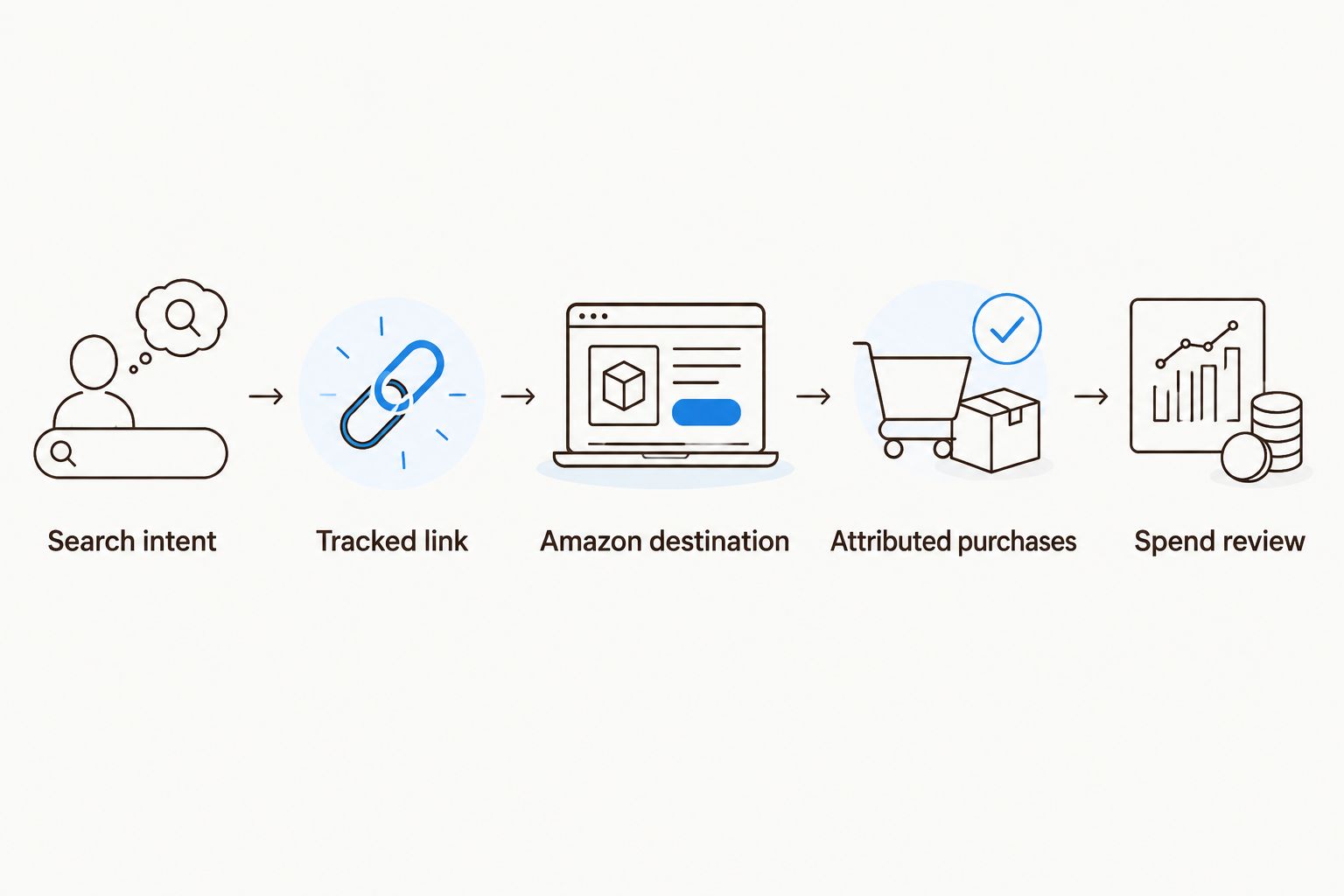
Validate the tracked destination before using reported purchases to judge spend.
Calculate external campaign return as attributed Amazon sales divided by Google Ads spend. Calculate cost per attributed purchase as Google Ads spend divided by attributed purchases. When purchases are zero, report the cost-per-purchase result as undefined rather than presenting a misleading value.
Booscala's Amazon management scope brings listing, advertising, and operational decisions together. The trade-off is scope: a Google Ads account and its conversion-import engineering still need named ownership.
Variant: route routine searches to an Amazon Store
A product detail page is not always the right answer. A shopper searching for a brand's cleansing routine needs a different destination from someone searching for a named cleanser.
Build the Store variant as a separate workflow:
Choose a Store page that presents the relevant routine or range without unrelated catalog distractions.
Create its own Amazon Attribution measurement record and generated link. Do not reuse a product-page link simply because the campaign promotes the same brand.
Set the Store attribution link as Final URL in the relevant Google ad. Align the ad wording with the products and explanation on that page.
Review reported product and brand outcomes separately. Document what the report measures before comparing it with your direct-to-product campaign.
Expected result: Routine searches lead to a browsing experience, while specific product searches retain a direct path to the detail page.
Repeat the destination check whenever the Store layout or promoted assortment changes in 2026. A valid link can still land on a page that no longer answers the original search.
Do not declare the Store variant better because it reports broader brand sales. Compare equivalent outcome definitions and account for the extra selection step. Destination fit comes first; attribution totals come second.
Troubleshooting
Google records clicks, but Amazon Attribution shows no activity
Check that the live ad contains the complete generated attribution link, not the untagged destination copied from an older campaign. Inspect inherited tracking settings, confirm the marketplace, and allow for reporting latency before concluding the link failed.
The ad is disapproved for its destination
Inspect Final URL, displayed domain, redirects, and tracking settings against Google's destination requirements. Correct the mismatch and request review through the account; attribution parameters do not exempt an ad from destination rules.
Google Ads shows no Amazon purchase conversions
That is the expected result without a separate, supported conversion-import implementation. Read purchases in Amazon Attribution; do not rename a click conversion as a purchase to make the Google dashboard look complete.
Purchases appear under an unexpected traffic segment
Look for reused attribution links, copied ads, and inconsistent mapping records. Separate the links for future traffic and document the contaminated reporting period rather than retroactively assigning purchases without evidence.
Reports disagree on timing or sales scope
Align time zones and date ranges, then inspect attribution windows and advertised-product versus brand-level columns. Do not force Amazon Attribution totals to equal overall Amazon orders or Google Ads clicks; those reports measure different events.
Customize your workflow
Once the route works, expand by marketplace, product intent, or destination type. Change one configuration unit at a time so a broken link does not disappear inside a larger rollout.
For your 2026 reporting record, add fields for attribution scope, export date, campaign owner, and destination-change history. Keep raw exports alongside the joined report. That makes later corrections traceable without rewriting the original evidence.
Booscala is an Amazon management agency, not a conversion-tracking product. Use its listing and operational scope where the problem is the Amazon buying experience; assign Google Ads administration and technical data transfer explicitly.
Before increasing traffic, review product information, variation clarity, and the destination's answer to the search query. Better tracking explains the outcome. It does not repair an unclear listing.
Review your Amazon management needs
Connect beauty listing, advertising, and operational decisions under a defined Amazon management scope.
FAQ
How do I track Google Ads to Amazon listings conversion?
Use Amazon Attribution links as the destinations for eligible Google Ads traffic and compare attributed purchases with Google spend. Keep a mapping record so each traffic segment matches its Amazon measurement record.
Can I install a Google conversion tag on my Amazon listing?
No, you cannot install your own Google conversion tag on Amazon's product pages or checkout. Measure eligible external traffic through Amazon Attribution instead.
Does Amazon Attribution send purchases into Google Ads automatically?
No, Amazon Attribution reporting does not automatically create a Google Ads purchase conversion feed. Any separate import requires a supported implementation and appropriate identifiers; a campaign-level export alone is not enough.
Is a product page better than an Amazon Store for Google Ads?
A product page is the better fit for a specific product search; a relevant Store page fits searches that require browsing a range or routine. Evaluate both with separate links and equivalent outcome definitions.
What attribution window does Amazon Attribution use?
Amazon Attribution uses a 14-day attribution window and a last-touch model under Amazon Ads' published methodology. Recent clicks therefore need time before their associated purchase reporting is treated as settled.
Can I use Target ROAS for Amazon sales in Google Ads?
Target ROAS cannot optimize toward Amazon purchase values that Google Ads does not receive. Use a bid strategy aligned with the conversion data actually available in the account.
Can Booscala manage the Amazon side of this workflow?
Booscala manages Amazon listings, advertising, and operations for beauty brands. Define Google Ads ownership and technical reporting responsibilities separately rather than assuming they are included.
One last thing
An attributed sale is not proof of an incremental sale. Branded Google searches can capture shoppers who already intended to buy your product on Amazon.
Keep branded and non-branded traffic separate from the start. That single configuration choice makes your later growth analysis more useful than a combined return figure that hides where demand originated.
