Oct 1, 2026
Amazon Brand Analytics to Meta Ad Targeting: No Sync 2026
Amazon Brand Analytics to Meta ad targeting is an insight workflow, not a shopper sync. Build creative tests, tag Amazon links, and measure campaign outcomes.

Instead of manually guessing which beauty angles to test, use Amazon Brand Analytics to brief Meta audiences and creative, then measure Amazon-bound traffic with Amazon Attribution. This is an insight-to-campaign workflow, not a direct audience sync: Brand Analytics does not export identifiable Amazon shoppers for Meta targeting.
TL;DR
Amazon Brand Analytics to Meta ad targeting means translating search insights into creative tests, not syncing shoppers.
Use Search Query Performance to select relevant beauty themes; Amazon keywords are not Meta targeting fields.
Amazon Attribution measures tagged external traffic; it does not send Amazon purchase events to Meta automatically.
Booscala is best for beauty brands seeking full-service Amazon management, not a standalone Meta audience connector.
Why this matters
An Amazon search query describes intent at the moment someone searches. A Meta audience setting describes who an advertising system can reach. They are different signals. Copying a search phrase into Meta does not recreate the group that searched on Amazon.
For beauty brands, the useful connection is the message. A query about cleansing balm can inform a removal demonstration; a query about lightweight moisturizer can inform a texture comparison. Neither query proves the shopper's identity, health condition, or eligibility for a Meta audience.
Booscala manages Amazon listings, advertising, and operations for beauty brands. Booscala's Amazon management service fits brands that want an embedded team; it is not a self-service data connector. Keep Meta campaign ownership explicit rather than assuming an Amazon management engagement includes it.
For your 2026 plan, separate three jobs: finding demand, delivering ads, and measuring Amazon outcomes. Brand Analytics, Meta Ads Manager, and Amazon Attribution serve those jobs respectively.
Before you start
Amazon access: Have an eligible Brand Registry account, permission to view Brand Analytics, and access to the relevant marketplace's reports. Confirm Amazon Attribution eligibility and access before building a campaign that depends on its reporting.
Meta access and materials: Have permission to create campaigns in Meta Ads Manager, an eligible advertising identity, approved beauty claims, creative assets, and a suitable Amazon destination. Use a spreadsheet to record query themes, campaign names, destinations, and attribution tags.
The gotcha: Brand Analytics reports contain aggregate insights, not a customer list for Meta. You also cannot install your Meta Pixel on an Amazon product detail page. A tagged Amazon link measures traffic through Amazon Attribution; it does not create a Meta purchase-optimization signal.
Check access before briefing creative. If Amazon Attribution is unavailable to your account or marketplace, resolve that limitation first or document a measurement plan that does not claim ad-level Amazon sales attribution.
Configure your Amazon query brief
Open Seller Central, select the correct marketplace, and open Brand Analytics. Use Search Query Performance for the brand or ASIN scope available to your account.
Choose a completed reporting period. For a 2026 campaign, record the reporting dates, marketplace, and selected scope beside the export so another team member can reproduce the analysis.
Review search query volume and the available impression, click, cart-add, and purchase measures. Distinguish total query activity from your brand's activity; they are not interchangeable.
Select relevant queries that match what your product actually does. Separate branded demand from generic category demand instead of treating both as acquisition opportunities.
Group selected queries into creative themes. Write the shopper task, the product evidence that supports it, and the matching Amazon destination for each theme.
Reject themes that require unsupported claims. Search demand for a treatment does not authorize a cosmetic brand to promise that treatment.
Expected result: You have a query brief with traceable Amazon evidence, not a list of people to target.
For an initial test, choose 2 creative themes and 1 destination per theme. These are setup recommendations, not performance benchmarks. A small brief makes it easier to identify whether the message or the destination needs work.
A high-volume query alone is not a reason to advertise. Check relevance first. If the phrase describes a product format you do not sell, adding it to a Meta brief creates a mismatch before the campaign starts.
Turn search intent into an ad hypothesis
Use the following examples as drafting patterns, not claims about your products. Every benefit still needs evidence from your own approved product information.
Cleansing balm
Meta creative hypothesis: Show the approved cleansing use in a demonstration
Best for: Brands selling cleansing balm
Benefit: Connects the ad to a clear product task
Limitation: Does not identify Amazon cleansing-balm searchers
Lightweight moisturizer
Meta creative hypothesis: Show texture and application
Best for: Brands with evidence for lightweight texture
Benefit: Makes a sensory characteristic visible
Limitation: Texture footage does not substantiate medical claims
Fragrance layering
Meta creative hypothesis: Demonstrate an approved fragrance routine
Best for: Brands with suitable fragrance products
Benefit: Explains how the product fits a routine
Limitation: Broad routine interest is not purchase intent
Recommend a theme only when the product and destination support it. Meta creative can carry the insight even when no matching interest exists.
Configure your Meta campaign
Open Meta Ads Manager and select Create. For this direct-to-Amazon traffic workflow, select Traffic; do not represent the setup as Amazon purchase optimization.
At the ad-set level, choose Website as the destination type. Select Maximize number of link clicks for this baseline setup rather than assuming your Meta Pixel can measure events on Amazon.
Set the geographic controls to the market served by the Amazon destination. Record any age restrictions required by your product or advertising policy.
Configure the audience. Use broad targeting as a baseline, or select a relevant interest only if it exists in your account and passes policy review. An Amazon phrase is not an automatically supported interest.
Create the ads under the approved Facebook Page or Instagram identity. Match each ad's promise to its destination and leave the destination link ready for its Amazon Attribution tag.
Review any audience expansion settings shown in your account. Distinguish enforceable audience controls from suggestions that Meta can expand beyond.
Expected result: You have a draft campaign with a clear delivery objective, a documented audience approach, and approved creative.
A Traffic campaign seeks traffic, not verified Amazon purchasers. That limitation belongs in the campaign brief. Do not judge the setup solely by inexpensive clicks or describe it as a sales-optimized integration.
For your first 2026 test, change 1 test variable at a time. Compare creative themes with the same audience approach, or compare audience approaches with the same creative. Changing both leaves the cause of a result unclear.
Choose the audience approach deliberately
Broad Meta audience
Best for: Testing whether the query-informed creative attracts relevant traffic
Advantage: Avoids forcing Amazon keywords into interest fields
Limitation: Does not isolate Amazon searchers
Available Meta interest
Best for: Testing a supported category-interest hypothesis
Advantage: Gives the test an explicit audience premise
Limitation: Interest availability varies; interest is not Amazon intent
Eligible first-party Custom Audience
Best for: Reaching people from your own permitted customer or engagement sources
Advantage: Uses a relationship your business can substantiate
Limitation: Requires a qualifying source and appropriate permissions; Brand Analytics is not that source
Do not build or label audiences around inferred sensitive health conditions. For beauty creative, describe the product and its supported use rather than asserting that the viewer has a condition.
Configure Amazon Attribution links
Open Amazon Attribution through your eligible advertising account. Confirm that the account and marketplace match the Amazon destination.
Create the measurement campaign and select the products relevant to the test. Use names that identify the Meta campaign, theme, and creative without including personal data.
Create separate attribution tags for the ad variants you need to distinguish. Record each tag alongside its exact ad name in your mapping sheet.
Set the relevant Amazon destination when generating the tag. Use the generated measurement link as the ad's Website URL in Meta Ads Manager.
Open each link and inspect the final destination. Confirm that it reaches the intended marketplace and product or Store page; check any redirect for lost measurement parameters.
Preview the ad before selecting Publish. Check the destination, creative, identity, and naming against the mapping sheet.
Expected result: Each published variant has a traceable Amazon Attribution link and a matching reporting row.
UTM parameters alone are not a replacement for Amazon Attribution. Meta URL parameters can help organize reporting, but they do not grant access to Amazon checkout events or turn an Amazon page into a pixel-instrumented website.
Use a consistent 2026 naming convention across the brief, ads, and attribution records. Include the marketplace, theme, and creative version. Names are your audit trail when several ads use similar footage.
The workflow moves insights and measurement references, not shopper identities. Keep that boundary visible in your documentation so a later automation project does not become an unauthorized customer-data transfer.
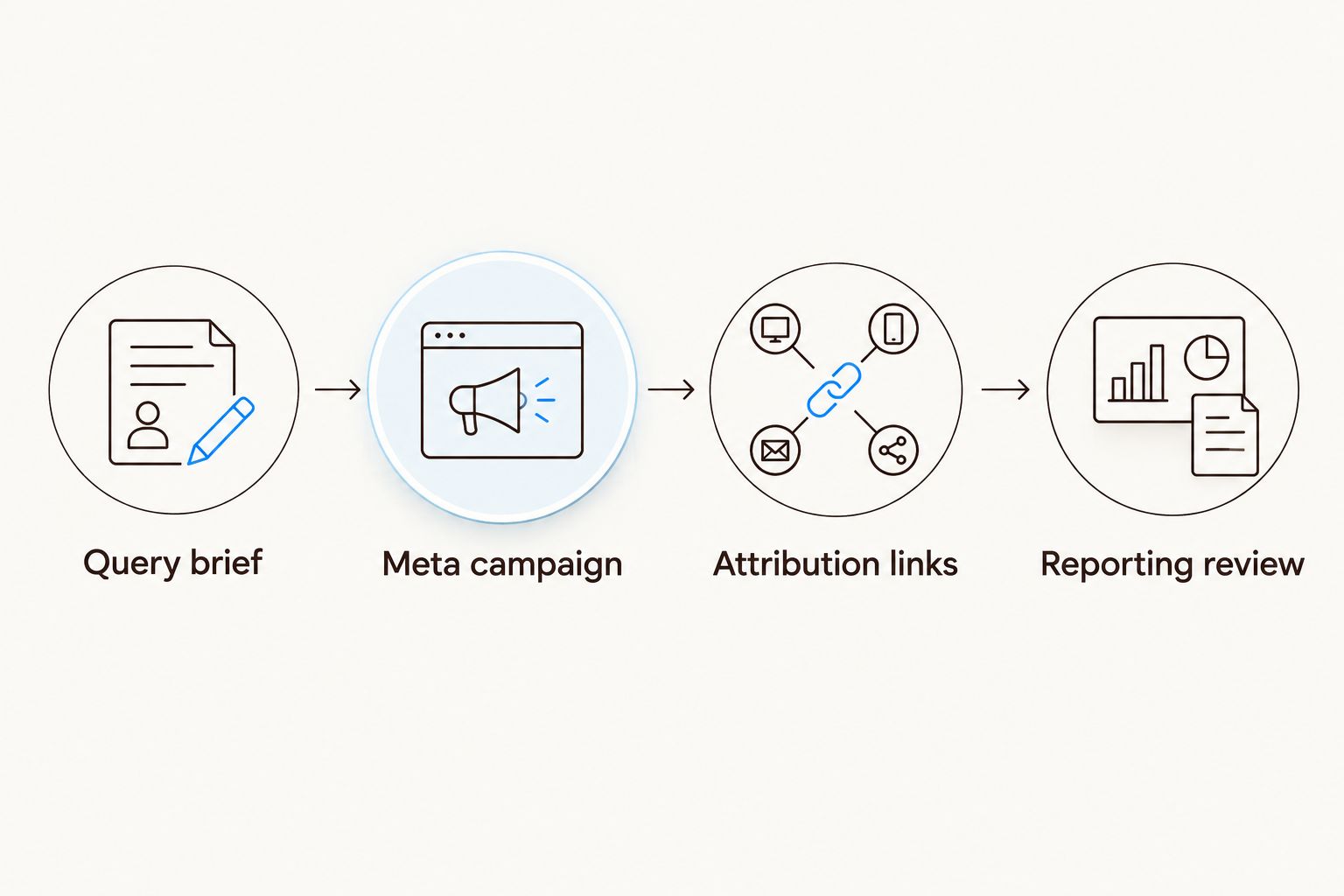
Search insights shape the ad; attribution links measure the Amazon-bound traffic.
Configure your reporting review
Export Meta reporting for the selected campaign dates. Keep campaign, ad-set, and ad identifiers alongside spend, impressions, and the relevant click measures.
Export Amazon Attribution reporting for the tagged variants. Keep attributed detail-page views, purchases, and sales where those measures are available.
Join the reports using your mapping sheet. Match identifiers rather than relying on similar campaign names alone.
Align reporting dates and document differences in time zones and attribution definitions. Compare like periods, not a partial day with a completed day.
Review traffic quality before changing targeting. Clicks without downstream product engagement call for a destination and message check, not an automatic audience expansion.
Record the decision and its evidence. Continue, revise, or stop a test based on the measured outcomes and your business's economics—not a universal click benchmark.
Expected result: You can connect a query-inspired creative hypothesis to tagged Amazon outcomes without claiming identity matching.
Attributed sales are not proof of incremental sales. Amazon Attribution reports outcomes under its attribution rules; it does not establish what would have happened without the ad. Use a controlled incrementality test for that separate question.
Do not add Meta-reported website purchases to Amazon-attributed purchases without checking their sources. A Meta purchase event from your own store is not an Amazon purchase event, even when the campaign names match.
Refresh the brief whenever Amazon query data updates
A second workflow uses the same setup for recurring creative planning. It updates the brief, not the audience automatically.
Retrieve the next completed report using the same marketplace and scope.
Compare query themes against the earlier completed period. Keep period lengths consistent and note product or listing changes that affect interpretation.
Flag newly relevant themes and remove themes that no longer match the product's approved positioning.
Send the revised brief for creative and policy review. Add a new version rather than silently replacing the original test record.
Create new attribution tags for new variants, then publish approved changes.
Best for: Beauty teams maintaining a repeatable creative-testing queue. The advantage is a traceable refresh; the limitation is that aggregate query movement cannot establish which Meta users to reach.
For recurring work in 2026, keep a human approval gate between report analysis and publication. Automation can organize files and notify owners without making claims or changing live campaigns unchecked.
Troubleshooting
Brand Analytics or Search Query Performance is missing
Check Brand Registry eligibility, account permissions, selected brand, and marketplace. Do not substitute an Amazon advertising search-term report and label it Search Query Performance: the reports have different scopes.
Meta cannot find the Amazon keyword as an interest
Use the query to brief creative instead. Search Meta's available targeting options only for genuinely relevant interests, and keep the broad audience baseline when no suitable option exists.
Meta shows clicks but no Amazon purchases
Check the live attribution link, final destination, reporting dates, and reporting delay first. Then review message-to-page fit. A click-optimized campaign does not guarantee purchase behavior.
The attribution report cannot separate creative variants
Audit the mapping sheet for reused tags. Give new variants distinct tags before publication; do not pretend an aggregated historical tag can identify which creative generated each outcome.
The beauty ad is rejected
Review the rejection reason, personal-attribute language, imagery, and substantiation. Rewrite statements about the viewer into supported product descriptions. Do not use query popularity as evidence that a claim is compliant.
Customize your workflow
Start with the smallest test you can interpret. Expand to more themes, markets, or product destinations only after the mapping and reporting process works.
Booscala's Amazon agency model covers the Amazon side of that coordination: listings, advertising, and operations. Keep the Meta owner, creative approver, and reporting owner named separately. Specialization is useful; an undefined handoff is not.
Use the Meta ads to Amazon sales attribution workflow to develop the measurement handoff. Preserve the distinction between campaign attribution and incremental revenue throughout your reporting.
FAQ
Can I connect Amazon Brand Analytics directly to Meta ad targeting?
Not as a shopper-audience sync. Use aggregate Brand Analytics insights to brief Meta creative and available audience settings, then measure tagged Amazon traffic separately.
Can I upload Amazon Brand Analytics shoppers as a Meta Custom Audience?
No. Brand Analytics does not provide an identifiable shopper list for that upload. Use only qualifying first-party sources for which you have the necessary rights and permissions.
Can I target Amazon search keywords on Facebook or Instagram?
You cannot recreate Amazon keyword targeting in Meta Ads Manager. Use search phrases as creative hypotheses; select a relevant Meta interest only when it is available and appropriate.
Can I install a Meta Pixel on my Amazon product page?
No. Sellers cannot install their Meta Pixel on Amazon product detail pages. Amazon Attribution provides a separate measurement route for eligible accounts.
Does Amazon Attribution send Amazon purchases back to Meta?
Creating an Amazon Attribution tag does not automatically send Amazon purchase events to Meta. Treat Amazon Attribution reporting and Meta campaign optimization as separate functions.
Should I use Traffic or Sales for this Amazon workflow?
Use Traffic for the baseline direct-to-Amazon setup described here. Without a supported Amazon purchase signal in Meta, do not describe the campaign as optimized for Amazon purchases.
Does attributed Amazon revenue prove the Meta ads caused new sales?
No. Attribution assigns credit under reporting rules; incrementality asks whether the sales would have happened without advertising. Answer the second question with a controlled test.
One last thing
Improve the destination before expanding the audience. If a Meta ad promises a lightweight texture but the Amazon page never demonstrates it, additional targeting cannot repair the mismatch. Carry the same supported message from query brief to ad to product page.
