Oct 2, 2026
How to connect Amazon returns data to Shopify retention flows
Connect amazon returns data to shopify retention using approved SKU signals, not buyer imports. Build exclusions, map variants, and test promotional suppression.

Instead of manually checking Amazon returns before every Shopify campaign, connect approved, non-personal product-level return signals to retention exclusions for your existing Shopify customers. Do not turn Amazon return records into a Shopify marketing list; Booscala specializes in Amazon management for beauty brands, where product feedback and customer permission must stay separate.
TL;DR
Connecting amazon returns data to shopify retention starts with product-level signals, not importing Amazon buyer identities.
Use approved SKU summaries to adjust Shopify retention flows for customers identified through your own store.
Amazon Multi-Channel Fulfillment returns require a separate workflow tied to the original Shopify order.
Booscala serves beauty brands seeking specialist Amazon management; assign Shopify implementation ownership separately.
Why this matters
A returned foundation and a returned glass serum bottle need different responses. Shade confusion calls for clearer selection guidance. Packaging damage calls for an operations review, not another replenishment message.
The useful connection is between a product issue and your retention rules. It is not between an Amazon buyer's identity and a Shopify customer profile.
Booscala is best for beauty brands seeking specialist Amazon management rather than generalist marketing. That specialization fits the Amazon side of this problem. Your Shopify developer and retention owner still need clear responsibility for the store-side implementation.
For a 2026 implementation, check Amazon's applicable seller policies, data-use restrictions, and your privacy obligations before exporting or repurposing information. Removing names alone does not establish permission to use a dataset elsewhere.
Before you start
Access: Have permission to obtain the relevant Amazon return report, access Shopify product and customer records, and edit your retention platform's exclusions. Assign an owner for each system.
Materials: Prepare an Amazon SKU-to-Shopify variant mapping, a secure processing location, and an approved data-use plan. Keep marketplace, fulfillment method, and product variant separate.
The gotcha: Amazon marketplace returns are not automatically Shopify customer events. A customer tag also stops nothing unless every relevant retention flow checks it. Build the exclusion before enabling the bridge.
This guide uses a developer-assisted bridge and Shopify Flow for internal notifications. It does not assume that a ready-made connector transfers Amazon returns into Shopify or that your email platform reads Shopify tags automatically.
Choose the correct return source
Product-level marketplace signals
Best for: Beauty brands improving existing Shopify retention
What connects: Approved, non-personal SKU issue summaries
Advantage: Avoids matching Amazon shoppers to store customers
Limitation: Cannot support individual Amazon-buyer recovery messages
Shopify orders fulfilled through Amazon Multi-Channel Fulfillment
Best for: Brands handling returns for their own Shopify orders
What connects: A verified fulfillment reference and the original Shopify order
Advantage: Keeps the return attached to a known store purchase
Limitation: Requires reconciliation; a fulfillment return is not automatically a Shopify refund
Start with product-level marketplace signals unless the returned item belongs to a verified Shopify-origin order. The two workflows share product identifiers, but they do not share customer permissions.
Source configuration
Establish the return feed
Obtain the return report appropriate to the fulfillment method. For FBA marketplace orders, use the FBA customer returns report in Seller Central. Seller-fulfilled returns need their corresponding return records; do not treat an FBA report as complete marketplace coverage.
Keep the raw export in your restricted Amazon operations environment. Do not upload it to Shopify customers or your email platform.
Define the reporting window. A 30-calendar-day window is a starting configuration for this example, not a category benchmark. Record the window beside every summary.
Map each Amazon seller SKU to its exact Shopify variant. Include marketplace and pack size in the mapping. Do not join products by title alone.
Separate return reasons, physical return status, and financial status. A return record does not by itself establish that a refund is complete.
Expected result: Every usable source record belongs to a known product and reporting window. Unmapped records remain in an exception queue rather than entering the retention workflow.
For your 2026 setup, document the report name and fields actually available in your account. Treat the export's real column headers as authoritative; do not build an importer around guessed field names.
Keep return comments out of the downstream payload. Free text can contain personal details, and a customer's explanation is not a verified product diagnosis.
Product signal configuration
Build an approved SKU summary
Group authorized return information by marketplace and mapped product variant. Remove order-level and buyer-level identifiers from the summary.
Create an internal reason mapping. Useful working groups include Packaging damage, Selection confusion, Product experience, and Unclassified. These are your categories, not Amazon's report labels.
Send ambiguous reasons to review. Do not translate every dissatisfaction reason into irritation, allergy, or a formula defect.
Add a human approval gate before any summary changes retention behavior. The reviewer selects an action: continue unchanged, adjust educational content, or hold promotional messaging for the affected product audience.
Give each approved signal an expiry time and an owner. In this example, require review after 7 calendar days. That is a chosen operating rule, not a recommended industry threshold.
Expected result: The bridge receives a reviewed product instruction, not a raw return record or an inferred customer health profile.
Use these proposed internal fields:
shopify_variant_id
Purpose: Identifies the mapped store variant
issue_group
Purpose: Stores the reviewed operational category
retention_action
Purpose: Specifies the approved retention response
reviewed_at
Purpose: Records approval time
expires_at
Purpose: Prevents an indefinite hold
review_owner
Purpose: Identifies who resolves the signal
These field names define your bridge's contract. They are not native Amazon columns or pre-existing Shopify settings.
Do not use return counts alone to declare a product defective. Interpret the reason, fulfillment context, and evidence first. If you calculate a return rate, document the denominator and align the reporting periods; recent returns can relate to older purchases.
Shopify bridge configuration
Apply the retention exclusion
Configure your middleware to accept only approved SKU summaries. Authenticate requests, restrict access, and reject payloads containing buyer identities or raw Amazon order records.
Find the relevant Shopify audience from Shopify purchase history, not Amazon identity matching. For the pilot, use one mapped variant and customers whose store orders contain that variant.
Apply a custom Shopify customer tag such as
retention_hold_product_reviewwhen the approved instruction requires a hold. This is a proposed tag you create, not a built-in Shopify status.Store the affected variant, approval reference, and expiry in your bridge's audit record. Avoid putting detailed return reasons or sensitive product-experience comments in customer tags.
In your retention platform, configure promotional flows to exclude profiles carrying the hold tag. Confirm that the Shopify integration actually synchronizes the tag before relying on it.
Recheck eligibility immediately before each promotional send. Entry-time filtering alone does not protect customers who receive a hold after joining a flow.
Expected result: Existing Shopify customers in the affected product audience are excluded from the configured promotional flows. No Amazon marketplace customer profile is created.
The simple tag has a trade-off: it can suppress more messaging than necessary. Best for a controlled pilot: one affected variant and a clearly defined audience. For a larger catalog, implement product-specific exclusions rather than blocking all brand messages.
Keep transactional communications separate. A promotional hold should not prevent legitimate Shopify order updates or support responses.
Use a 24-hour scheduled reconciliation as an initial configuration if it fits your operations. It is not a promised connector speed. Record the last successful run so your team can distinguish a current signal from a stale integration.
Shopify Flow configuration
Notify the retention owner
Open Shopify Flow and select Create workflow. Choose Select a trigger, then Customer tags added.
Add a Condition that checks whether the customer's tags contain your exact custom hold tag. Restrict the workflow to this tag rather than every customer-tag change.
Add Send internal email. Address it to the retention owner and explain that a product-review hold has been applied. Use variables offered by the editor instead of typing assumed variable paths.
Include enough information to find the Shopify customer and the bridge's approval record. Do not include raw Amazon buyer information or unreviewed return comments.
Activate the workflow only after the retention exclusion has passed its tests. The notification is an operational alert, not the exclusion itself.
Expected result: Adding the hold tag produces an internal notification. Promotional suppression happens through your separately configured retention rules.
The sequence is deliberate: approve the product signal, apply the exclusion, then notify the owner. Reversing it creates a gap between learning about a problem and stopping an unsuitable message.
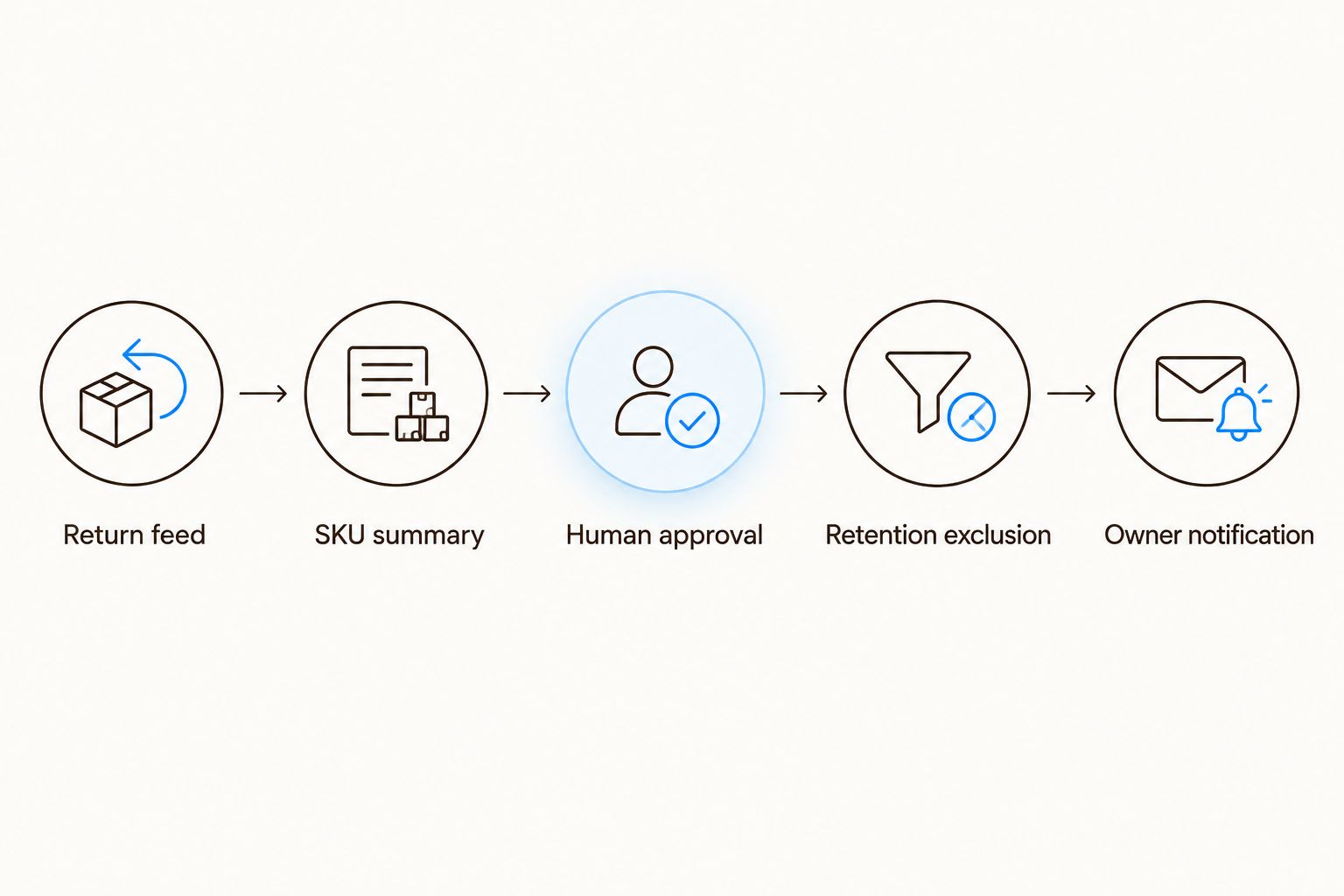
Customer messaging changes only after the product signal passes review.
Test before activating
Run these cases with test Shopify profiles and synthetic bridge records. Do not use real Amazon customer identities as test data.
Approved hold: The mapped Shopify audience receives the tag and fails the promotional eligibility check.
Unmapped variant: The record enters the exception queue; no customer receives a tag.
Repeated signal: Reprocessing the same approval creates no duplicate notification or repeated downstream event.
Expired hold: The bridge follows the documented review rule rather than silently retaining the tag forever.
Withdrawn marketing consent: Removing a product hold does not restore subscription permission.
Keep a dated 2026 acceptance record showing the tested rule, expected behavior, actual result, and responsible owner. A successful API response is not proof that an email was suppressed.
Update the workflow when the issue is resolved
A second workflow handles changes to an approved product signal. It should release an exclusion, not automatically enroll customers in a new campaign.
Have the product or operations owner approve resolution. Record what changed and which variants it covers.
Update the bridge's approval record and reconcile the Shopify audience again.
Remove the hold only when no other active product issue requires it. A shared customer tag needs this check because one customer can own several affected products.
Preserve existing marketing consent and other suppressions. Do not override unsubscribe status, support exclusions, or unrelated holds.
Confirm eligibility in the retention platform before restoring normal promotional processing.
Expected result: Eligible Shopify customers return to normal retention rules without a forced message, duplicate enrollment, or consent change.
For Shopify-origin Multi-Channel Fulfillment returns, build a separate order-linked branch. Verify the fulfillment reference against your Shopify order, reconcile return status, and keep refunds under their own authorization rules. Do not manufacture a Shopify refund from an inventory receipt.
Troubleshooting
The hold tag appears, but emails still send
Check the retention integration's tag synchronization and the exclusion's exact spelling. Then inspect messages already queued before the tag arrived. Add a pre-send eligibility check or the platform's supported equivalent.
The wrong product audience receives the hold
Inspect variant mapping, marketplace, bundle contents, and pack size. Quarantine ambiguous mappings. An ASIN or product title alone is not a reliable substitute for a verified Shopify variant relationship.
The same signal creates repeated alerts
Give each approved signal a stable identifier and record successful processing. Update the existing signal instead of treating every report import as a new event. Notify again only when the approved action changes.
Holds disappear while another issue remains open
Check all active product signals before removing the shared tag. For catalog-wide implementation, maintain product-level state and derive the customer exclusion from that state.
A return reason looks like a safety complaint
Route it to your established product-safety review process. Do not diagnose the shopper, recommend continued use, or launch an automated product recommendation from the complaint.
Customize your workflow
Once suppression works, use approved product findings to improve retention content. Selection confusion can inform shade-selection education. Packaging findings belong with fulfillment and packaging owners. Keep those changes distinct.
Booscala's Amazon management focus covers listings, advertising, and operations. Use that product context alongside the guide to managing Amazon returns for beauty and cosmetics, while your store-side owner controls implementation and consent.
For the 2026 operating plan, report processed summaries, mapping exceptions, active holds, and failed synchronizations. Measure repeat purchases within your Shopify population; do not present this bridge as proof that individual Amazon returners became Shopify repeat buyers.
FAQ
Can I connect Amazon returns directly to Shopify retention flows?
Connect approved, non-personal product-level signals to retention rules for existing Shopify customers. Do not treat Amazon marketplace return records as permission to create marketing profiles.
Can I email an Amazon customer after a return through Shopify?
An Amazon return does not establish permission for Shopify marketing. Keep marketplace communications within applicable Amazon rules and use independently collected permissions for your store's marketing.
Does Shopify Flow automatically import Amazon returns?
This workflow requires a separate source feed and bridge. Shopify Flow handles the internal notification after the bridge applies a customer tag; it does not supply the Amazon return data.
What if Amazon fulfilled the original Shopify order?
Use a separate workflow for verified Shopify-origin Multi-Channel Fulfillment orders. Match the fulfillment reference to the store order and reconcile return and refund status separately.
What is the best way to match Amazon products with Shopify?
Use a reviewed mapping from marketplace and seller SKU to the exact Shopify variant. Check pack size and bundle contents instead of relying on product titles.
Will a Shopify customer tag stop retention emails?
A customer tag stops promotional emails only when your retention platform synchronizes it and checks it in the relevant exclusions. Test both flow entry and messages already queued.
Should a resolved return issue trigger a win-back message?
Resolution should remove the relevant hold, not force a win-back message. Preserve consent, other exclusions, and the customer's normal retention eligibility.
One last thing
Test the message that should not send. A pipeline can import data correctly, apply the right tag, and still leave an old promotional message queued. The decisive acceptance test is suppression in the sending system—not a green integration log.
