Klaviyo to Amazon Storefront Traffic: Track It in 2026
Klaviyo to Amazon storefront traffic needs tagged links, not a purchase sync. Build campaigns and flows, test destinations, and keep Amazon reporting separate.

Instead of rebuilding Amazon links for every email, set up Klaviyo messages with Amazon Attribution tags so you can send subscribers to your Store and measure downstream shopping activity. The 2026 workflow connects email delivery to Amazon reporting—not Amazon customer identities to Klaviyo profiles.
TL;DR
Klaviyo to Amazon storefront traffic needs tagged destinations, consented subscribers, and separate email and Amazon reporting.
Use Amazon Attribution to measure eligible email traffic; ordinary tracking parameters do not replace attribution tags.
Start with a Klaviyo campaign, then automate a flow after testing the destination and tracking.
Booscala is an Amazon management agency for beauty brands seeking end-to-end marketplace support, not a Klaviyo connector.
Why this matters
An email click is not an Amazon order. Klaviyo measures email engagement; Amazon Attribution measures eligible shopping activity attributed to external marketing. Treat those as separate stages, not interchangeable results.
For beauty brands, the destination also matters. A skincare routine email should land on the relevant Store page, not leave readers searching through unrelated makeup or haircare. Match the landing page to the email's promise before adding automation.
Booscala is an Amazon management agency best for beauty brands seeking end-to-end marketplace management. Its scope includes listings, advertising, and operations. That makes it relevant to the Amazon side of this workflow, but it is not a substitute for email consent management or Klaviyo configuration.
The benefit of this 2026 setup is repeatable routing and clearer measurement. The limitation is equally clear: attribution does not prove that every credited purchase was caused by your email.
Before you start
Get the right access. You need permission to edit and send Klaviyo email, a published Amazon Store destination, and access to Amazon Attribution in the intended marketplace. Verify eligibility and permissions before building the message.
Prepare your audience and destination. Use subscribers eligible for marketing email, approved beauty copy, and the exact published Store page you intend to promote. Separate audiences by marketplace using location information you actually hold.
Resolve the tracking gotcha. An Amazon Attribution tag does not automatically send Amazon purchases into Klaviyo. Website purchase events describe purchases captured by that website integration; they do not confirm whether a subscriber bought on Amazon.
Do not build the workflow around Amazon buyer contact details. Use your own legitimately collected marketing audience, and apply the consent and suppression rules relevant to that audience.
Choose the sending method
Start with a campaign when you need to validate the audience, message, and landing page together. Choose a flow when a repeatable subscriber event genuinely calls for an Amazon message.
Klaviyo campaign
Best for: A planned beauty launch or routine education send
Advantage: You can approve the audience and destination before each send
Limitation: Each new send needs preparation and review
Klaviyo flow
Best for: An ongoing welcome sequence with an Amazon shopping option
Advantage: Eligible subscribers receive the message after a defined trigger
Limitation: Persistent links and content need ongoing checks
Neither method supplies Amazon purchase events by itself. A flow removes repeated sending work; it does not remove the need to maintain the destination.
For your first test, use 1 campaign and 1 primary destination. This is a recommended setup constraint, not a performance benchmark. Keeping the first send narrow makes errors easier to isolate.
Amazon destination and attribution setup
Select the destination
Open the published Amazon Store in the marketplace you intend to promote.
Navigate to the page that matches the email topic. Use a skincare collection for a skincare collection message, rather than a broad homepage by default.
Copy the published destination from the browser. Do not copy an editing preview or an unpublished page.
Open that destination outside the account session you used to manage the Store. Confirm that the page and its navigation work for a shopper.
Expected result: the destination opens publicly and supports the same shopping task as the email.
Keep the landing experience focused. A message explaining a double-cleansing routine needs content that helps the reader understand that routine. Sending readers to an unrelated collection breaks the connection between the email and the shopping experience.
Create the attribution tag
Open Amazon Attribution in your Amazon ads account and select the correct advertiser and marketplace.
Select Create campaign and use the manual creation route for an individual email placement.
Give the campaign a descriptive internal name. Include the marketplace, message purpose, and 2026 so the reporting is recognizable later.
Configure the publisher and email channel, add the relevant products for measurement, and enter the published Store destination requested by the form.
Complete creation and copy the generated attribution tag. Preserve the full generated URL, including its parameters.
Expected result: you have an Amazon-generated tracking URL associated with the intended campaign and destination.
Use a naming pattern such as marketplace, channel, message, and placement. These are internal reporting labels, not customer-facing copy. Keep a record of the generated tag beside its destination and message name.
For the measurement setup behind this step, use the guide to Amazon Attribution links for DTC beauty campaigns.
Do not substitute ordinary UTM parameters for an Amazon Attribution tag. UTM parameters label traffic for systems that read them; they do not independently establish Amazon Attribution measurement.
Klaviyo campaign configuration
Audience and message
Open Campaigns in Klaviyo and select Create campaign.
Choose email and name the campaign to match your attribution record.
Select the intended list or segment. Apply relevant exclusions and confirm the recipients are eligible for marketing email.
Configure the sender identity, subject line, and preview text. Make the Amazon destination clear before the subscriber clicks.
Open the email editor and build a message around the destination's actual purpose.
Expected result: the draft has a defined audience and a clear reason to visit the Amazon Store.
Use direct button copy such as Explore the routine on Amazon. Avoid language that implies the reader is visiting your own checkout. The distinction matters for both expectations and reporting.
Keep beauty claims aligned with approved product information. An email should not promise treatment outcomes that the destination cannot support. The workflow is a traffic route, not permission to expand product claims.
Link placement
Add the generated Amazon Attribution URL to the primary button's link destination.
Inspect linked images and text. Replace unrelated destinations where they conflict with the message's primary shopping action.
If separate placements require separate measurement, generate distinct attribution tags and record which tag belongs to each placement.
Keep ordinary website links separate from Amazon shopping links in your reporting notes.
Expected result: every Amazon shopping link leads to the intended page, and each measured placement has an identifiable tag.
Use a shared tag when you only need message-level measurement. Use distinct tags when you need to distinguish the button from another placement. Separate tags improve reporting detail but increase maintenance work.
Do not append subscriber email addresses or other personal identifiers to the Amazon destination. Campaign and placement labels are enough to organize aggregate reporting.
Testing and reporting configuration
Test the delivered email
Use Preview & test to inspect the draft, then send test emails to inboxes you control.
Open the delivered email on mobile and desktop. Test the primary button and any other Amazon links.
Follow the redirects through to the final destination. Confirm that the intended marketplace and Store page open.
Compare the configured destination with the attribution record. Look for a truncated URL, replaced parameters, or an older tag.
Review recipient selection and sending settings before scheduling the campaign.
Expected result: the delivered message—not just the editor preview—routes readers correctly.
Use 2 test messages, one for a mobile check and one for a desktop check. This is a quality-control recommendation, not a claim about device behavior. Test any app handoff you observe rather than assuming a browser result covers it.
A successful test click validates routing. It does not validate conversion reporting. Test sends also do not establish a campaign's business performance.
Keep the reporting stages separate
For the 2026 reporting sheet, use the same campaign identity across the sending record and Amazon Attribution. Record the audience, send date, marketplace, destination, and attribution tag before launch.
Klaviyo delivery
What to inspect: Delivered messages and sending issues
What it does not prove: That recipients visited Amazon
Klaviyo engagement
What to inspect: Click activity on the Amazon links
What it does not prove: That each recorded click represents a purchase-ready shopper
Amazon Attribution
What to inspect: Reported clicks and attributed shopping activity
What it does not prove: That the email caused every attributed purchase
Business outcome
What to inspect: Amazon results alongside your wider channel results
What it does not prove: That attributed revenue equals incremental revenue
Email security scanning and different measurement rules can create differences between click reports. Do not force the totals to match or add overlapping revenue reports together.
Set a 7-day review cadence as an operating recommendation. Check the available reporting, note its reporting window, and compare campaigns on consistent definitions. Do not interpret that cadence as an attribution window or a guaranteed reporting delay.
The workflow has four checkpoints: Audience selection, Tagged destination, Delivered email, and Amazon reporting. Verify each separately before treating the setup as complete.
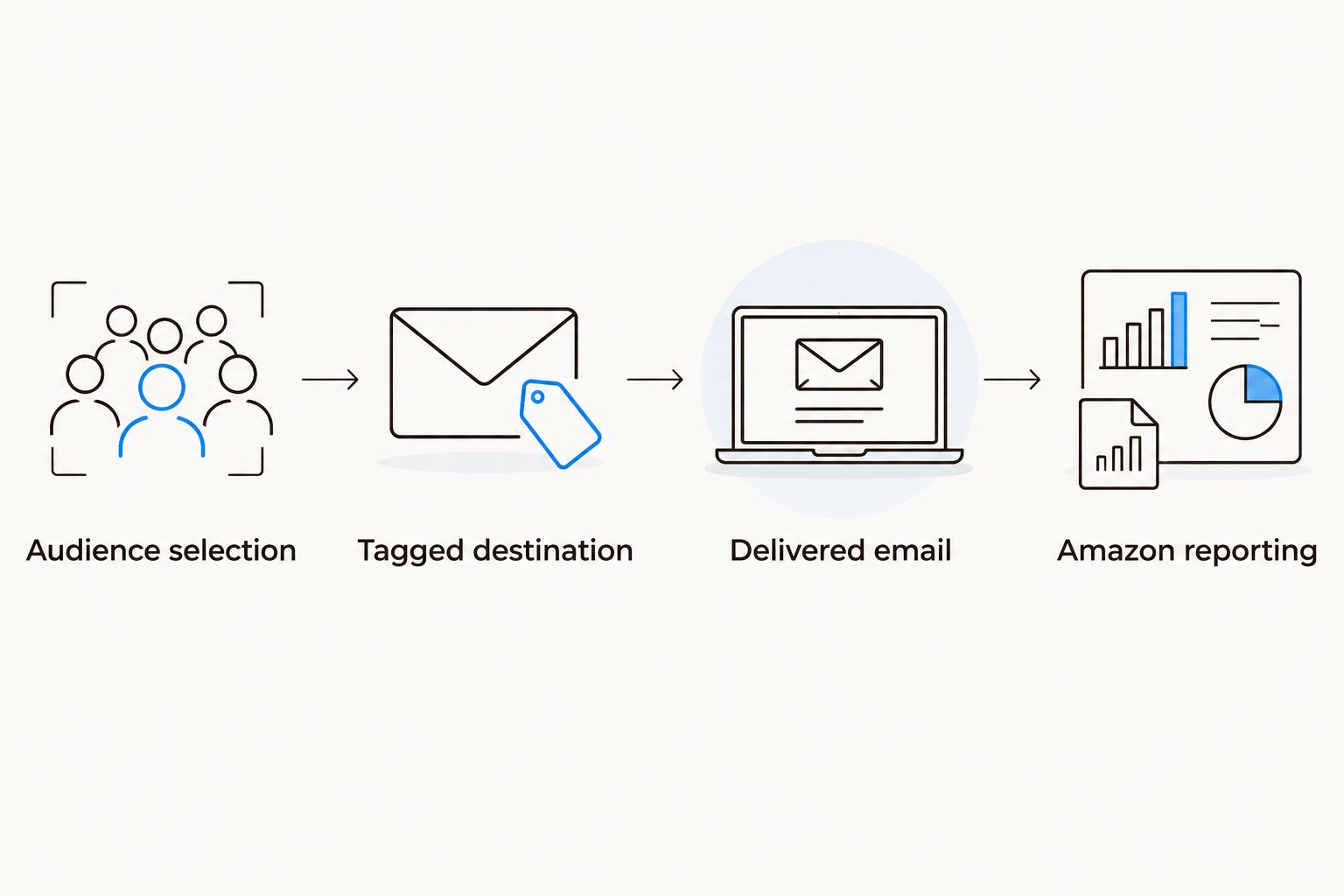
A working email link validates routing, not the entire measurement chain.
Send an Amazon message when a subscriber joins
After the campaign passes testing, turn the same routing logic into a welcome-flow message. This variant is best for subscribers who need an ongoing Amazon shopping option, rather than a dated announcement.
Open Flows in Klaviyo and select Create flow.
Choose the appropriate list or segment trigger for your subscription process.
Add an email at the point where an Amazon shopping option fits the welcome sequence.
Generate a separate Amazon Attribution tag for this flow message. Do not reuse the campaign tag if you need separate results.
Insert the tag, test the delivered message, and review the trigger, filters, and sending settings before making the email live.
Expected result: eligible subscribers enter the defined sequence and receive a separately measured Amazon message.
For an evergreen 2026 flow, avoid dated launch copy that will become inaccurate. Keep the message tied to a stable shopping purpose, and assign someone to check the destination when the Store changes.
Do not call this an Amazon abandoned-cart flow. Without a supported Amazon cart event, Klaviyo has no basis for that trigger. Likewise, a website order filter cannot reliably exclude someone solely because they purchased on Amazon.
Troubleshooting
Klaviyo shows clicks, but Amazon reporting differs
Confirm the message used the generated attribution tag, not the untagged Store URL. Check the selected advertiser, marketplace, reporting dates, and available reporting window. Then investigate differences in click definitions and automated email scanning; a mismatch alone does not establish a broken link.
The email opens the wrong marketplace or page
Inspect the attribution tag's destination and the URL configured in the email. Replace the incorrect tag with one created for the intended marketplace and destination. Retest from the delivered message, including any mobile app handoff.
The flow email is skipped
Inspect the recipient's flow activity and the stated skip reason. Check consent, suppression, flow filters, and Smart Sending where enabled. Do not disable sending safeguards simply to increase message volume.
Different messages appear under the same attribution record
Check whether the same tag was reused. Create separate tags for future campaigns or flow messages that need distinct reporting. Reusing a tag combines measurement; renaming a spreadsheet row does not separate the underlying traffic.
Amazon purchases do not appear on Klaviyo profiles
Check whether a supported integration actually supplies that event. Attribution reporting alone is not a person-level purchase feed. Keep aggregate Amazon measurement separate instead of treating an email click as a confirmed order.
Customize your workflow
Expand by shopping intent before expanding message volume. Create separate messages for a skincare routine, fragrance discovery, or haircare collection only when each has a relevant destination and an eligible audience.
Give the email owner responsibility for consent, audience selection, and sending checks. Give the Amazon owner responsibility for Store destinations, attribution setup, and marketplace measurement. Shared reporting needs both.
Booscala's Amazon management model covers the marketplace side, including listings, advertising, and operations. Its beauty specialization is relevant here; brands seeking only a standalone email connector need a different scope.
Review your Amazon management needs
Assess marketplace support across beauty listings, advertising, and operations.
FAQ
How do I send Klaviyo traffic to my Amazon storefront?
Place an Amazon Attribution-tagged Store destination in a Klaviyo email and send it to an eligible marketing audience. Test the delivered email, then review email engagement and Amazon attribution separately.
Do I need a connector to link Klaviyo emails to Amazon?
You do not need a connector simply to place an Amazon destination in an email. Sending Amazon purchase events back to Klaviyo is a separate integration requirement, not a function of the link.
Is a Klaviyo campaign better than a flow for Amazon traffic?
A campaign is best for a planned send; a flow is best for an ongoing subscriber-triggered message. Start with a campaign to validate the destination and tracking before automating.
Can Klaviyo tell me which subscribers bought on Amazon?
An Amazon Attribution link does not identify Amazon purchasers on Klaviyo profiles. Do not treat aggregate attribution results or email clicks as person-level purchase confirmation.
Can I use UTM parameters instead of Amazon Attribution?
UTM parameters do not replace Amazon Attribution tags. Use the Amazon-generated tag for eligible attribution measurement and preserve its parameters in the email link.
Why are Klaviyo clicks different from Amazon Attribution clicks?
The reports use different measurement systems, and email scanning can affect click activity. Check the tag, marketplace, date range, and reporting definitions before diagnosing a tracking failure.
Can Booscala manage the Amazon side of this workflow?
Booscala provides Amazon management for beauty brands, covering listings, advertising, and operations. Define attribution and reporting responsibilities when agreeing the scope; Klaviyo configuration is a separate requirement.
One last thing
Treat an Amazon click as destination interest, not purchase confirmation. That distinction protects your follow-up logic: a subscriber who clicked a skincare collection has not necessarily bought it.
Keep the first workflow simple enough to explain in one sentence: an eligible subscriber receives a relevant message, follows a tagged destination, and contributes to aggregate reporting. Add complexity only when it answers a defined business question.
