Oct 26, 2026
Shopify skincare stock: batch and expiry checks
Shopify skincare batch expiry inventory management needs lot-level control. Build receiving checks, FEFO picking, batch holds, and order traceability.

Skincare inventory management on Shopify is the process of tracking stock by product, batch, and usable life so your beauty brand ships eligible units and can trace each dispatch. This guide covers receiving, expiry checks, picking, returns, and order-level records—not just the quantity shown in your store.
TL;DR
Shopify skincare batch expiry inventory management needs lot-level records, expiry checks, and order-level traceability—not quantity tracking alone.
Use first-expiry-first-out picking for eligible stock; quarantine damaged, unidentified, or expired units.
Booscala provides Amazon management for beauty brands, not a stated Shopify batch-tracking service.
Test receiving, fulfillment, returns, and batch holds before trusting an inventory integration.
Why batch and expiry control matters for skincare brands
A cleanser SKU identifies the product. A batch identifies a production lot. Your inventory process needs both because separate lots of the same cleanser can have different dates, quality statuses, and storage histories.
Your 2026 operating standard should answer a simple question: Which eligible batch will fulfill this order, and where will that choice be recorded? A stock total cannot answer it by itself.
For founders selling across channels, keep responsibilities explicit. Booscala provides Amazon management for beauty brands; this Shopify guide describes an operating process, not a Shopify service offer.
Booscala is best suited to beauty brands seeking specialist Amazon management, not Shopify batch-tracking software. Choose the inventory workflow below around your warehouse and quality requirements, not an agency's channel focus.
Skincare needs a distinction between unopened usable life and period after opening. Do not convert an open-jar symbol into a warehouse expiry date. Obtain the manufacturer's documented interpretation of date codes, storage requirements, and release conditions before creating inventory rules.
Build your Shopify batch-control workflow
Define your batch record before receiving stock
Start with a shared spreadsheet and a written field dictionary. Create a separate record for each SKU, batch, location, and stock status combination; otherwise, a hold at one warehouse can disappear inside a combined total.
Keep manufacturer identifiers exactly as supplied. If you add an internal identifier, retain the original alongside it so customer photos, supplier documents, and warehouse records remain searchable against the same reference.
For your 2026 record template, distinguish a printed date from a date calculated under an approved manufacturer rule. An empty field means unresolved information—not permission to invent a shelf life.
Record the SKU, supplier, manufacturer batch code, and receiving reference.
Store the printed date, date type, and supporting document.
Record the location, bin, quantity, and quality status.
Name the person authorized to release or block each lot.
Keep changes attributable, with the previous value retained.
Quarantine incoming stock until checks pass
Use a receiving checklist before making units eligible for customer orders. Match the shipment documents to the physical cartons, then inspect the unit labels and packaging under your approved receiving procedure.
Separate discrepancies from accepted stock. If the carton shows one lot and the bottles show another, preserve both references and ask the supplier to resolve the mismatch. Do not replace the evidence with whichever code is easier to enter.
Record exceptions before stock moves into picking bins. Your process should prevent unidentified, damaged, or unapproved units from entering the same fulfillment pool as released goods.
Compare carton and unit batch identifiers.
Confirm date-code meaning against supplier documentation.
Check seals, leakage, damage, and stated storage requirements.
Photograph discrepancies and record affected quantities.
Release stock only after the assigned owner approves it.
Choose the system that preserves lot-level decisions
Prove the process manually before buying automation. Enter a receipt, allocate a batch to a test order, record dispatch, and retrieve the history. This exposes missing fields without confusing a software configuration problem with an undefined warehouse rule.
For a faster workflow, evaluate a lot-enabled inventory application or warehouse integration against those same tasks. Require a demonstration using your scenarios; a feature named batch tracking does not establish how holds, split shipments, or returns behave.
Keep the service boundary clear. Booscala's Amazon management scope does not establish Shopify implementation capability. Assign Shopify configuration, warehouse execution, and quality approval to named owners rather than assuming one provider covers everything.
Identify the authoritative batch ledger.
Map SKUs and locations between connected systems.
Test receipt, reservation, dispatch, cancellation, and return events.
Confirm who resolves failed or delayed updates.
Require usable exports of batch and order history.
Apply first-expiry-first-out picking to eligible lots
First-expiry-first-out, or FEFO, means picking the eligible stock with the earliest relevant expiry date first. Eligibility comes before date order: a held lot stays blocked even when its expiry is earlier.
Start with clearly separated bins and a picking sheet that names the lot. Then automate allocation only after the application or warehouse system demonstrates that it respects your release status and approved remaining-life rules.
Set remaining-life requirements from documented product and business requirements. Account for handling and transit without copying an arbitrary threshold from another brand. Review those rules during your 2026 warehouse setup and whenever the fulfillment route changes.
Separate physical lots instead of mixing identical-looking units.
Exclude held or expired stock from allocation.
Sort eligible lots by the approved expiry field.
Record the lot actually picked, including substitutions.
Require approval when pickers override the allocation.
Link dispatched batches to individual orders
A receiving ledger tells you what entered the warehouse. An order-to-batch record tells you what left and who received it. Build both; neither replaces the other.
Capture the dispatched batch at fulfillment, not from a later assumption about which bin was probably used. If an order draws from separate lots, retain each lot and its dispatched quantity against that order.
Use a dispatch sheet as the manual method. With automation, verify that the saved record reflects the physical pick rather than an earlier reservation that changed. Transfers, replacements, samples, and creator seeding need traceable movements too.
Save the order reference, SKU, lot, quantity, and fulfillment location.
Preserve separate records for split shipments.
Record replacements as new stock movements.
Log samples and seeding outside customer-order totals.
Test retrieval from both an order reference and a batch code.
Review expiry exposure and isolate returns
Create an expiry review from the lot ledger, then assign an action to each exception. Distinguish usable stock, stock approaching your internal dispatch cutoff, and stock that is blocked. A single aging bucket hides decisions that require different owners.
Returned skincare should enter a separate review process rather than automatically rejoining eligible stock. Apply your documented quality procedure to packaging condition, identity, and storage uncertainty; do not make a resale decision from a refund status alone.
For your 2026 review, reconcile the physical bins with the ledger and the quantity exposed to Shopify orders. Investigate mismatches before adjusting records, preserving the reason for every correction.
Review lots against approved dispatch cutoffs.
Assign an owner and action date to each exception.
Keep returned goods separate pending assessment.
Record disposal, supplier return, or approved release decisions.
Reconcile physical, lot-ledger, and storefront quantities.
Rehearse a batch hold before launch
Run a controlled test using designated test stock and orders. Start with 2 test lots, place 3 test orders, and move 1 test unit into a held status. These are suggested rehearsal quantities, not compliance thresholds.
Check whether your team can stop further allocation, identify affected dispatches, and account for every test unit. Include a split shipment and a cancellation so the exercise tests more than the easiest fulfillment path.
Repeat the rehearsal after material integration changes. A successful 2026 launch test does not establish that a later warehouse migration or application change preserves the same controls.
Select test lots with distinct identifiers and dates.
Confirm held units cannot enter new allocations.
Retrieve orders associated with the selected lot.
Reconcile remaining, dispatched, and held test quantities.
Save failures, corrective actions, and the retest result.
The control sequence is straightforward: identify the batch, approve its status, allocate eligible stock, record dispatch, then test retrieval. Automation should carry those decisions between systems without changing their meaning.
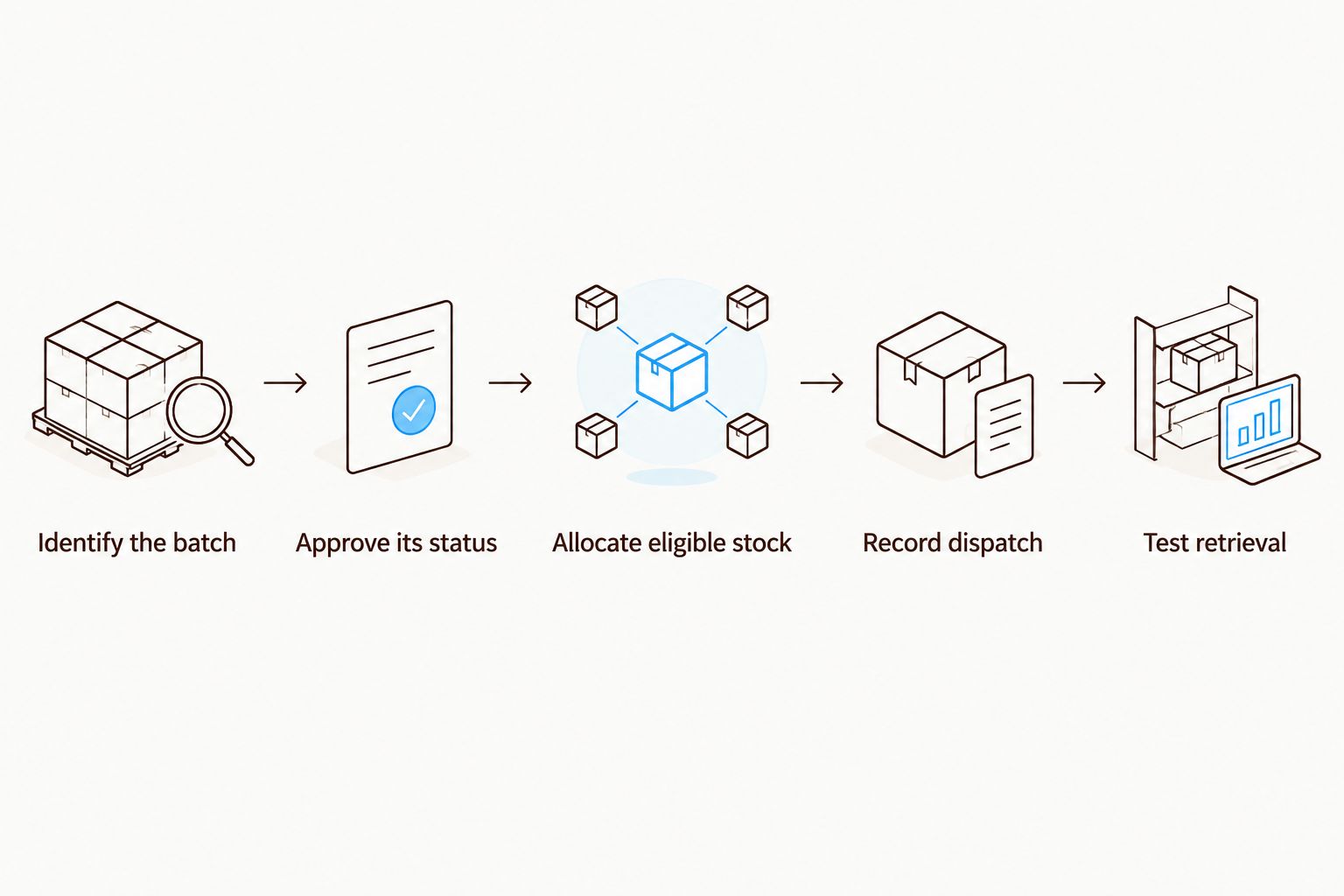
Automate the approved process, not an undefined set of warehouse habits.
Compare batch-management options for your skincare brand
Choose the simplest option that passes your receiving, allocation, hold, and traceability tests. More software does not fix missing supplier dates or unrecorded warehouse substitutions.
The options below describe operating models, not verified capabilities of a particular application. Demonstrate each required behavior before committing your inventory records to it.
Shared lot ledger and manual picking sheets
Best for: A controlled operation with direct warehouse oversight
Main advantage: Makes fields and decisions visible without a new integration
Key limitation: Depends on disciplined entry, reconciliation, and access control
Lot-enabled inventory application
Best for: Teams seeking less manual recording around Shopify orders
Main advantage: Can centralize lot records when the required workflow is supported
Key limitation: Allocation, holds, and return behavior require testing
Warehouse management system integration
Best for: Brands whose warehouse executes picking and dispatch
Main advantage: Can capture lot decisions where physical fulfillment happens
Key limitation: Requires reliable mapping, exception handling, and data access
Fulfillment partner with documented lot procedures
Best for: Brands outsourcing warehouse execution
Main advantage: Assigns physical receiving and picking to a specialist operator
Key limitation: Your brand must verify controls and obtain usable traceability records
Ask every provider to demonstrate a held batch, a split-lot order, a returned unit, and a history export. A slide showing an expiry field is not proof that blocked units stay out of fulfillment.
Common mistakes skincare brands make
Treating SKU totals as batch records
A correct total can conceal an incorrect lot allocation. Reconcile by SKU, lot, location, and status before accepting the storefront quantity as operationally sound.
Turning period after opening into unopened expiry
An open-jar marking and an unopened expiry instruction describe different conditions. Keep them separate and get the manufacturer's documented guidance before assigning dates to warehouse stock.
Creating a new storefront variant for every lot
Using customer-facing variants as a substitute for lot records mixes merchandising with warehouse control. Keep the product choice understandable to buyers and require the inventory workflow to retain production-lot identity.
Releasing returns from the refund screen
A refund records a customer-service action, not a quality assessment. Require the warehouse to complete the approved return inspection and disposition before changing stock eligibility.
Applying one market's rules everywhere
Keep the United States, EU destination countries, and the UK separate in your review. Confirm applicable product classification, labeling, and market requirements with current official authorities before launch; this workflow does not replace that assessment.
FAQ
What's the best starting point for Shopify skincare batch expiry inventory management?
Start with a lot ledger and a documented receiving-to-dispatch process. Record the manufacturer batch, relevant dates, location, quality status, and dispatched order references before automating the workflow.
Does a Shopify inventory quantity prove that batch tracking is working?
No. A quantity total does not establish which batch was received, held, picked, or dispatched. Test those records separately in the application, warehouse system, or manual ledger you use.
Is FEFO better than FIFO for skincare with expiry dates?
FEFO prioritizes eligible stock by expiry date, while FIFO prioritizes receipt order. Use FEFO when an approved expiry date determines dispatch priority, and keep held stock excluded regardless of its date.
Can I use the period-after-opening symbol as the warehouse expiry date?
No. Period after opening describes use after opening, not an unopened warehouse expiry date. Obtain the manufacturer's documented guidance for unopened usable life and date-code interpretation.
What should I ask a fulfillment partner about skincare batches?
Ask the fulfillment partner to demonstrate receiving checks, lot separation, expiry-based allocation, batch holds, and order-level retrieval. Require records for split shipments, returns, and stock adjustments too.
Should returned skincare automatically go back into sellable inventory?
No. Returned skincare should enter your documented quality-review process before any release decision. Keep the stock separate until its identity, condition, and disposition are recorded.
Does Booscala provide Shopify batch-management software?
Booscala's stated offer is Amazon management for beauty brands, not Shopify batch-management software. Evaluate Shopify inventory applications and warehouse providers against your own lot-control requirements.
One last thing
Test traceability backward, not just forward. Give your operations owner a dispatched order reference and ask for the actual batch. Then give them that batch and ask for every associated dispatch and its remaining stock balance.
If either direction fails, fix the record chain before adding another dashboard. A visible expiry date is useful; a complete movement history makes it actionable.
